The best camera external recorders do more than save footage: they can improve monitoring, extend recording options, enable RAW workflows, and simplify capture from compatible cameras.
This roundup compares 10 options across portable monitor-recorders, professional deck-style hardware, computer interfaces, and analog video capture devices so you can match the recorder to your camera and production setup.
Best 10 Camera External Recorders Picks for 2026
Professional RAW Monitoring

- 1500-nit 5.2-inch HDR touchscreen
- Records ProRes and ProRes RAW
- Camera control and professional monitoring tools
Best For: Mobile filmmakers needing RAW capture and detailed monitoring
Rackmount Broadcast Recording
Blackmagic HyperDeck Studio HD Plus

- Rackmountable broadcast recorder
- HDMI and RS-422 connections
- LCD screen, search dial, and Ethernet
Best For: Studio and broadcast installations
Touchscreen SDI Field Recording

- 6-inch 1080p touchscreen
- USB recording up to 1080p30
- 3G-SDI, HDMI, scopes, and LUT support
Best For: Field crews needing SDI/HDMI monitoring and recording
Compact 4K Capture Interface
Blackmagic UltraStudio Mini Recorder 12G

- 12G-SDI and HDMI inputs
- Supports UHD 4K60 capture
- Thunderbolt 4 output and broad software support
Best For: Computer-based capture, streaming, and production
Compact HDMI Recorder
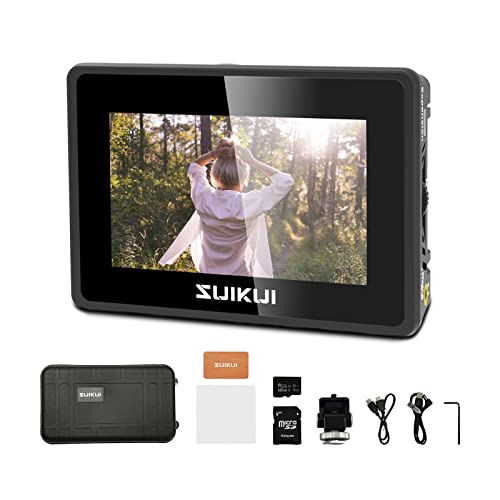
- H.264 1080p30 recording without a stated limit
- 3.5-inch, 600-nit preview display
- Waveform, zebra, peaking, and false color tools
Best For: Portable Full HD camera monitoring and recording
Pro Video I/O Recorder
Blackmagic UltraStudio Express 3G

- HDMI and 3G-SDI input support
- 10-bit digital video capability
- Compact interface for computers and DaVinci Resolve
Best For: Computer-based production, editing, and streaming workflows
4K On-Camera Recorder
Atomos Ninja 5.2 with 240GB SSD

- 4Kp60 recording in ProRes, DNxHD, and H.265
- Up to 6Kp30 ProRes RAW with compatible cameras
- Includes 240GB SSD and 5.2-inch monitor
Best For: Portable high-resolution HDMI camera recording
Best Value Analog-to-Digital Recorder

- Captures AV footage at up to 60fps
- Converts analog media to microSD
- Compact LCD design with clip mount
Best For: VHS, camcorder, FPV, and analog-footage archiving
Best Professional HDMI Recorder

- 5-inch, 1500-nit touchscreen monitor
- Records up to 6K RAW
- HDMI, Wi-Fi 6E, and NDI support
Best For: Professional monitoring and high-quality camera recording
Best Monitoring and Scopes Tool
Blackmagic Video Assist 5'' 3G

- Bright 5-inch Full HD LCD
- Adds scopes, focus assist, and 3D LUTs
- Portable HDMI monitor and recorder
Best For: Full HD camera monitoring and on-set image assistance
Professional RAW Monitoring – Atomos Ninja RAW
For filmmakers seeking a versatile option among camera external recorders, the Atomos Ninja RAW combines a bright HDR monitor, camera control, and direct ProRes or ProRes RAW recording. It supports CFexpress Type B media and external USB-C storage, making it suitable for mobile production setups.
Best For: Mirrorless and HDMI-camera users who need RAW recording, detailed monitoring, and camera control in the field.
Pros:
- 1500-nit, 5.2-inch HDR touchscreen for bright field monitoring.
- Records ProRes, ProRes RAW, ProRes RAW HQ, ProRes LT, 422, and 422 HQ.
- Includes waveform, focus peaking, EL Zone false color, and Onion Skin tools.
- Runs from NP-F batteries, USB-C power banks, or a DC adapter.
Cons:
- External storage and network adapters are sold separately.
- Its advanced features may be more than basic recording workflows require.
The Ninja RAW is a strong all-in-one choice when monitoring quality and flexible recording formats matter as much as capture. Its camera-control features and mobile power options add practical value for production work.
Rackmount Broadcast Recording – Blackmagic HyperDeck Studio HD Plus
The Blackmagic Design HyperDeck Studio HD Plus is a rackmountable broadcast recorder for setups that need a dedicated deck rather than a camera-mounted monitor. Its supplied features include HDMI and RS-422 connections, an LCD screen, search dial, Ethernet, and front-panel buttons.
Best For: Broadcast, studio, and rack-based workflows that need a dedicated recording deck with physical controls.
Pros:
- Rackmountable design suits permanent production installations.
- Provides HDMI and RS-422 connections.
- Includes an LCD screen, search dial, Ethernet, and control buttons.
Cons:
- The supplied notes do not specify recording formats or included media.
- Its deck-style design is less portable than a camera-mounted recorder.
This HyperDeck is best considered a studio-oriented component among camera external recorders. Choose it when rack integration and hands-on deck controls are priorities, rather than compact field operation.
Touchscreen SDI Field Recording – FEELWORLD CUT6S
The FEELWORLD CUT6S is a practical field option among camera external recorders, pairing a 6-inch touchscreen with HDMI and 3G-SDI connectivity. It records compatible video up to 1080p30 to a FAT32 USB flash drive and adds monitoring tools for exposure and focus.
Best For: DSLR and field-camera users who want an affordable monitor-recorder with SDI/HDMI routing and LUT support.
Pros:
- 6-inch 1920×1080 touchscreen provides a clear monitoring view.
- Records up to 1080p30 in MP4 format to a FAT32 USB flash drive.
- Supports 3G-SDI input/output and HDMI input with loop-out functionality.
- Offers waveform, RGB parade, vectorscope, histograms, and custom LUT output.
Cons:
- NP-F battery is not included in this package.
- Recording is limited to compatible video up to 1080p30.
The CUT6S is a flexible choice for crews that need both SDI and HDMI monitoring in a compact package. Its USB recording and LUT-enabled outputs are useful, though users should plan for separate battery and storage purchases.
Compact 4K Capture Interface – Blackmagic UltraStudio Mini Recorder 12G
The Blackmagic Design UltraStudio Mini Recorder 12G is a compact computer-connected option among camera external recorders. It accepts 12G-SDI and HDMI sources, supports common codecs up to UHD 4K60, and sends the signal to a computer over Thunderbolt 4 for use with popular production software.
Best For: Streamers, editors, and production teams capturing HDMI or SDI video directly into a computer.
Pros:
- Supports 12G-SDI and HDMI inputs.
- Handles common video codecs up to UHD 4K60.
- Works with DaVinci Resolve, Wirecast, vMix, OBS, and other popular software.
- Supports uncompressed and compressed 10-bit 4:2:2 YUV and 4:4:4 RGB quality.
Cons:
- Requires a computer connection through Thunderbolt 4.
- It is an interface rather than a standalone field recorder.
The UltraStudio Mini Recorder 12G is a strong fit when the computer is the center of the workflow. Its 4K60 support and broad software compatibility make it useful for live production, capture, and post-production input.
Compact HDMI Recorder – RH35 1080p Camera Monitor
The RH35 is a compact option for anyone comparing camera external recorders for straightforward 1080p capture. It records H.264 video at 1080p30 without a stated recording limit, accepts 1080p60 HDMI input/output, and saves MP4 files to a microSD card or USB flash drive.
Best For: Camera operators, meeting presenters, medical or sports setups, and users who want a small preview monitor with built-in recording and exposure tools.
Pros:
- Records H.264 1080p30 video without a stated time limit.
- Includes useful monitoring tools such as waveform, zebra, peaking, focus assist, and false color.
- Lightweight 3.5-inch design with 600-nit brightness and 178-degree viewing angles.
- Supports recording to both microSD cards and USB flash drives.
Cons:
- Its maximum display resolution is 800×480.
- Recording is limited to 1080p30 rather than 4K.
- The supplied specifications list one HDMI port and one USB port.
The RH35 makes the most sense when portability and simple Full HD recording matter more than high-resolution capture. Its built-in image-assist features add practical value for camera monitoring, while the compact screen keeps the setup easy to carry.
Pro Video I/O Recorder – Blackmagic UltraStudio Express 3G
The Blackmagic UltraStudio Express Recorder 3G is aimed at computer-based workflows that need camera external recorders with HDMI and 3G-SDI connectivity. Its compact design supports 10-bit video and is compatible with computers, DaVinci Resolve, and live-streaming software.
Best For: Editors, streamers, and production users integrating HDMI or 3G-SDI sources with a computer-based video workflow.
Pros:
- Provides both HDMI and 3G-SDI video input options.
- Supports 10-bit digital video.
- Works with DaVinci Resolve, computers, laptops, and live-streaming software.
- Compact 100-gram form factor with listed power consumption of 2.5 watts.
Cons:
- The supplied notes do not specify onboard storage or standalone recording.
- Its listed SDI capability is 3G rather than higher-speed SDI formats.
- Computer and software compatibility may require a suitable host setup.
This model is better understood as a compact professional video interface for connecting sources to a computer than as a self-contained field recorder. Its HDMI, 3G-SDI, and 10-bit support make it a practical choice for production and streaming workflows built around compatible software.
4K On-Camera Recorder – Atomos Ninja 5.2 with 240GB SSD
The Atomos Ninja is a strong fit for shoppers seeking camera external recorders that combine monitoring and high-resolution capture. This bundle includes a 5.2-inch recording monitor and 240GB SSD, with HDMI input and recording support up to 4Kp60 in Apple ProRes, Avid DNxHD, and H.265.
Best For: DSLR, mirrorless, and cinema-camera users who want a portable HDMI monitor-recorder with professional recording formats.
Pros:
- Records up to 4Kp60 in Apple ProRes, Avid DNxHD, and H.265.
- Supports up to 6Kp30 in Apple ProRes RAW when used with compatible cameras.
- Includes a 240GB SSD for recording storage.
- Offers a 5.2-inch monitor and wireless screen-sharing features through compatible Atomos devices and platforms.
Cons:
- Video input is listed as HDMI, with no SDI input specified.
- Apple ProRes RAW recording depends on a compatible camera.
- The bundle does not list a battery, instead including a battery eliminator and USB-C PD power cable.
The Ninja is the most capable high-resolution option in this group, especially for HDMI-equipped DSLR, mirrorless, and cinema cameras. Its included SSD, broad codec support, and 5.2-inch monitor make it well suited to more demanding production setups, provided the camera and power arrangement are compatible.
Best Value Analog-to-Digital Recorder – PowerPlay DVR
For straightforward camera external recorders use, the PowerPlay DVR is a compact option for capturing AV footage and converting older analog media. It records to a microSD card and supports PAL or NTSC standard-definition video, making it suited to FPV, camcorder, VCR, and tape-archiving tasks.
Best For: Digitizing VHS, 8mm, MiniDV, Digital8, and other analog footage, plus portable FPV or field recording.
Pros:
- Records AV video at up to 50fps PAL or 60fps NTSC.
- Supports microSD cards up to 512GB Class 10.
- Compact design includes a 2.4-inch LCD and clip mount.
- Built-in rechargeable-battery support and approximately three hours of stated battery life.
Cons:
- Limited to standard-definition video capture.
- Battery cells are not included.
- Requires AV connections rather than HDMI.
This is a practical, portable choice when compatibility with analog sources matters more than high-resolution HDMI recording. Its included AV cable and clip mount add convenience, though users should plan for compatible battery cells and a microSD card.
Best Professional HDMI Recorder – Atomos Ninja TX GO
Atomos Ninja TX GO 5-inch Camera Monitor-Recorder, HDMI CFexpress Wi-Fi HDR Touchscreen ProRes RAW
Check Price On AmazonThe Atomos Ninja TX GO is a high-end choice among camera external recorders, combining a bright five-inch monitor with professional recording and connectivity features. It accepts HDMI input and can capture formats including ProRes RAW, ProRes, Avid DNx, and H.265/H.264 to compatible CFexpress Type B or USB-C storage.
Best For: Professional camera operators who need on-camera monitoring, RAW recording, flexible codecs, and wireless or network workflows.
Pros:
- 1500-nit, five-inch touchscreen with camera-control and monitoring tools.
- Captures up to 6K RAW to CFexpress Type B or compatible USB-C storage.
- Supports HDMI input/output and Wi-Fi 6E, with NDI streaming support.
- Works with major editing platforms including DaVinci Resolve, Premiere Pro, Final Cut Pro, and Avid Media Composer.
Cons:
- Compatible storage and some accessories are sold separately.
- It is substantially more feature-rich than needed for basic recording.
- Power options require USB-C, an NP-F battery, or an AC adapter.
With RAW capture, multiple codec choices, and a bright touchscreen, the Ninja TX GO is designed for demanding production workflows rather than simple clip recording. Its storage and power requirements should be included in the overall setup budget.
Best Monitoring and Scopes Tool – Blackmagic Video Assist 5'' 3G
Blackmagic Design Video Assist 5'' 3G Portable Monitor, Recorder, Scope, and Viewfinder
Check Price On AmazonThe Blackmagic Design Video Assist 5” 3G combines a portable LCD monitor, recorder, scopes, and viewfinder in one unit. For camera external recorders users who prioritize on-camera viewing and monitoring assistance, it offers a Full HD display, HDMI connectivity, 3D LUTs, HDR support, and professional scopes.
Best For: Camera operators who want a portable Full HD monitor with recording, focus-assist tools, scopes, and viewfinder functions.
Pros:
- Five-inch 1920×1080 LCD display with 2500 cd/m² brightness.
- Includes professional scopes, focus assist, 3D LUTs, and HDR features.
- Provides HDMI connectivity with two HDMI ports listed.
- Backed by a two-year warranty.
Cons:
- Its listed resolution is Full HD rather than 4K or higher.
- At 771g, it is heavier than many compact monitor options.
- The supplied specifications do not detail recording codecs or media capacity.
This Video Assist is a sensible fit for filmmakers who need clear monitoring and exposure or focus tools alongside recording capability. Its bright display and professional assist features are useful outdoors, while the Full HD limit may matter for higher-resolution workflows.
How We Picked the Best Camera External Recorders
We selected these Camera External Recorders by comparing their connection standards, supported resolutions and codecs, recording media, monitoring features, portability, and intended workflow. The list includes HDMI and SDI devices, portable on-camera monitors, computer-based capture interfaces, professional broadcast recorders, and analog video converters.
Compatibility was treated as the first priority. A recorder is only useful if your camera provides the right output and can deliver the desired resolution, frame rate, color format, and signal type. We also considered whether each product is best suited to field production, studio work, live capture, archival transfer, or a hybrid setup.
Quick Comparison
- Best for RAW and advanced mirrorless workflows: Atomos Ninja RAW and Atomos Ninja TX GO.
- Best for portable 4K monitoring and recording: Atomos Ninja with SSD bundle.
- Best for SDI field production: FEELWORLD CUT6S and Blackmagic Video Assist 3G.
- Best for studio and broadcast-style recording: Blackmagic HyperDeck Studio HD Plus.
- Best for computer-based capture: Blackmagic UltraStudio Mini Recorder 12G and UltraStudio Express 3G.
- Best for basic HDMI capture: RH35 Unlimited Recording Camera Monitor.
- Best for analog sources: PowerPlay DVR Video Recorder.
Key Buying Factors for Camera External Recorders
Input, Output, and Camera Compatibility
Check whether your camera outputs HDMI, micro-HDMI, full-size HDMI, SDI, or an analog signal. Confirm the recorder accepts the exact connector and signal standard. Some cameras limit HDMI output by resolution or frame rate, while others require menu settings to provide a clean feed.
Resolution, Frame Rate, and Codec
Choose a recorder that supports the quality you actually need. 1080p is often sufficient for basic capture and streaming, while 4K and RAW recording provide more flexibility for professional post-production. ProRes, ProRes RAW, and other codecs vary in storage requirements, editing compatibility, and image flexibility.
Recording Media and Storage
Portable models commonly use SSDs, CFexpress cards, SD cards, or proprietary media. Verify sustained write-speed requirements, maximum supported capacity, and whether the necessary drive or card is included. High-resolution recording can fill storage quickly.
Monitoring and Power
Touchscreens, scopes, focus aids, exposure tools, HDR displays, and camera-control features can make a recorder much more valuable than a simple capture box. For field work, also consider battery compatibility, heat management, mounting options, screen brightness, and cable strain.
Computer and Streaming Workflow
Computer interfaces are useful when recording directly into editing, production, or streaming software. Check operating-system support, Thunderbolt or USB requirements, driver availability, and whether the unit captures or merely passes through the signal.
Who Should Buy Which Camera External Recorders?
Choose an Atomos Ninja model if you use a compatible mirrorless or cinema camera and want a portable monitor-recorder with stronger codecs, RAW support, or camera-control features. These are especially appealing for filmmakers who need an on-camera display and recorder in one device.
Choose Blackmagic Video Assist or FEELWORLD for SDI-equipped cameras, field monitoring, and production setups where scopes, touch controls, and a larger viewing surface matter. Confirm the supported signal format before purchasing.
Choose a HyperDeck if you need a more stationary recorder for studio, broadcast, playback, or rack-oriented work. Choose UltraStudio when your main destination is a computer rather than removable media.
Choose the RH35 for straightforward HDMI monitoring and capture, or the PowerPlay DVR for older analog sources such as VHS, Hi8, Mini DV, and RCA-equipped devices. In every case, verify the source output, required cables, recording format, and storage workflow before ordering.