Choosing the right interface can make a huge difference when you’re recording guitar amps at home. The best models keep your tone clear, your latency low, and your workflow simple.
In this roundup, we focus on practical audio interfaces for recording guitar amps that suit beginners, solo musicians, and growing home studios alike.
Best 10 Audio Interfaces for Recording Guitar Amps Picks for 2026
Compact Starter Interface
Focusrite Scarlett Solo 3rd Gen for Guitarists

- 1 Hi-Z input for guitar or bass
- 24-bit/192kHz recording and playback
- Air mode and low-noise outputs
Best For: Guitarists wanting a simple, clean USB interface for amp capture and vocals
Budget 2-Channel Workhorse
PreSonus AudioBox 96 Anniversary Edition
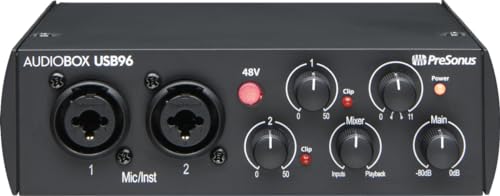
- Two high-headroom instrument inputs
- USB bus-powered for portable use
- Zero-latency mixer control
Best For: Budget-minded guitarists who want two inputs and bundled software
Modern Solo Upgrade
Focusrite Scarlett Solo 4th Gen for Guitar Tracking

- 120dB dynamic range and flagship converters
- 1 Hi-Z input for guitar recording
- Improved Air mode for presence and drive
Best For: Songwriters and guitarists who want a compact interface with upgraded fidelity
Mobile Phone Direct Monitor
JOYO MOMIX CAB Guitar Interface

- Zero-latency direct monitoring
- USB-C and Lightning plug-and-play
- Pocket-size with belt or strap clip
Best For: Phone-recording guitarists who want a tiny, portable dry-signal interface
Studio Ready 2-Channel
Focusrite Scarlett 2i2 4th Gen

- Two Hi-Z inputs for direct guitar recording
- Auto Gain and Clip Safe simplify level setting
- 24-bit/192kHz with 120dB dynamic range
Best For: Guitarists wanting a polished two-input interface for amp recording and home studio use
Portable Tone Hub

- 24-bit/96kHz guitar interface with low latency
- Dedicated amp out with FX or THRU modes
- Compact, bus-powered design for mobile use
Best For: Mobile guitarists who want a portable interface for amp recording and practice
Budget Versatile Pick
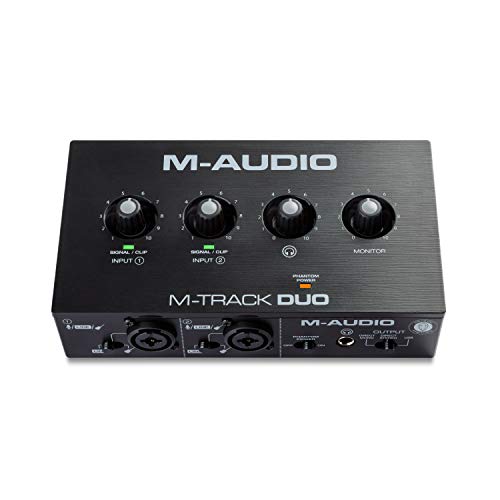
- Two combo inputs for guitar or microphones
- Zero-latency monitoring with USB/Direct switch
- Compact interface with included MPC Beats software
Best For: Beginners and budget users needing a simple two-input interface for guitar recording
Compact Guitar Routing Pick

- 24-bit/48 kHz guitar recording
- Amp out with FX or THRU modes
- Direct monitoring and headphone output
Best For: portable guitarists recording amp-based setups
Budget Dual-Input Choice
Mini 2 Channel USB Audio Interface

- 2 combo inputs with phantom power
- 48 kHz audio with direct monitoring
- Plug-and-play on Mac and Windows
Best For: entry-level recording and simple guitar/vocal setups
High-Resolution Creator Pick

- 24-bit/192 kHz recording quality
- Dedicated guitar input with impedance control
- Loopback, ASIO, and routing software included
Best For: home studio users who also stream or record content
Compact Starter Interface – Focusrite Scarlett Solo 3rd Gen for Guitarists
If you want a simple pick among audio interfaces for recording guitar amps, the Scarlett Solo 3rd Gen focuses on clean input, easy setup, and solid monitoring. It gives guitarists a Hi-Z instrument input, low-noise balanced outputs, and up to 24-bit/192kHz recording for capturing amp tones and DI parts with clarity.
Best For: Guitarists and solo creators who want an easy USB interface with strong preamps and reliable studio-quality capture.
Pros:
- 1 Hi-Z instrument input is ready for guitar or bass recording.
- 24-bit/192kHz converters support detailed studio-quality tracking.
- Air mode adds extra clarity to acoustic instruments and vocals.
- Low-noise balanced outputs help keep playback clean.
Cons:
- Only one instrument input, so it is not built for recording multiple guitars at once.
- Best suited to a simple desktop setup rather than a larger multi-input rig.
This is a practical entry point if you mainly need one high-quality channel for guitar amp recording and occasional vocal work. It keeps the feature set focused while still including useful software to get started quickly.
Budget 2-Channel Workhorse – PreSonus AudioBox 96 Anniversary Edition
Among audio interfaces for recording guitar amps, the AudioBox 96 stands out as a value-packed 2-channel option with two instrument inputs, MIDI I/O, and bus-powered portability. It is designed for straightforward guitar and bass recording, with zero-latency monitoring and enough flexibility for a compact home setup.
Best For: Players who want a budget-friendly, portable interface with two instrument inputs and included recording software.
Pros:
- Two high-headroom instrument inputs make it easy to record guitar and bass.
- USB bus power keeps the interface mobile-friendly with no extra power supply.
- Mixer control supports zero-latency monitoring blends.
- Includes Studio One Artist, Ableton Live Lite, and plug-ins.
Cons:
- Maximum sample rate is 24-bit/96kHz, which is lower than some newer interfaces.
- Global phantom power may be less flexible if you need separate mic control.
If you want a practical step up from the most basic interfaces, this model offers a lot for the money. It is especially appealing when you need simple guitar tracking, portable power, and a software bundle to get recording fast.
Modern Solo Upgrade – Focusrite Scarlett Solo 4th Gen for Guitar Tracking
If you are comparing audio interfaces for recording guitar amps and want a newer solo interface, the Scarlett Solo 4th Gen brings a bigger dynamic range and updated Air mode. It keeps the setup simple with one XLR mic preamp and one Hi-Z instrument input, while using the same converters found in Focusrite’s flagship line.
Best For: Guitarists and songwriter-producers who want a compact interface with upgraded sound quality and easy home recording.
Pros:
- 120dB dynamic range supports high-fidelity recording.
- 1 Hi-Z instrument input is ideal for direct guitar or amp capture workflows.
- Improved Air mode adds presence and harmonic drive to guitars.
- Includes recording software and a full collection of plugins.
Cons:
- Only one instrument input, so it is not meant for recording multiple guitar sources simultaneously.
- It remains a compact solo interface, not a feature-heavy studio hub.
This model makes sense if you want the familiar Scarlett format but with a more advanced sound spec. It is a strong fit for players who care about cleaner conversion and a little more polish in their recorded guitar tone.
Mobile Phone Direct Monitor – JOYO MOMIX CAB Guitar Interface
For phone-based recording, the MOMIX CAB is a very different kind of option in the field of audio interfaces for recording guitar amps. It is built for direct monitoring and dry guitar capture to a smartphone, with plug-and-play USB-C or Lightning connectivity and no need for charging or drivers.
Best For: Mobile players who want a tiny, easy-to-carry interface for recording dry guitar ideas to a phone.
Pros:
- Direct monitoring lets you hear the dry guitar signal with zero latency.
- Plug-and-play design needs no charging, drivers, or software setup.
- Pocket-size body with back clip makes it highly portable.
- Works with USB-C and Lightning connections, with included adapters.
Cons:
- The dry signal cannot be muted, so it is not meant for real-time software amp sims or effects processing.
- Android compatibility depends on OTG and is not guaranteed with every model.
- Maximum sample rate is 48kHz, which is more limited than full desktop interfaces.
This is best viewed as a mobile capture tool rather than a traditional studio interface. If your priority is fast phone recording and portable practice sessions, it keeps the process simple and lightweight.
Studio Ready 2-Channel – Focusrite Scarlett 2i2 4th Gen
If you’re comparing audio interfaces for recording guitar amps, the Scarlett 2i2 4th Gen is a straightforward studio option with two Hi-Z instrument inputs, 24-bit/192kHz recording, and a huge 120dB dynamic range. It is built for players who want easy gain staging, solid sound quality, and software support without a complicated setup.
Best For: Guitarists who want a polished two-input interface for recording amps, direct guitar tracks, and home studio work.
Pros:
- Two Hi-Z instrument inputs make it easy to plug in a guitar directly.
- Auto Gain and Clip Safe help set levels and avoid unwanted distortion.
- Air mode adds presence and harmonic drive to guitar recordings.
- Includes recording software and plugin bundles to get started quickly.
Cons:
- Only two channels, so it is not ideal for more complex multi-source sessions.
- Best suited to desktop studio use rather than ultra-portable guitar practice.
For players focused on clean, dependable amp capture, the Scarlett 2i2 4th Gen offers the most complete all-around recording package in this group. It balances sound quality, usability, and included software in a way that works well for home recording.
Portable Tone Hub – IK Multimedia iRig HD X
For guitarists looking at audio interfaces for recording guitar amps on the move, the iRig HD X is a compact one-channel interface built around low-latency monitoring, 24-bit/96kHz audio, and broad iPhone, iPad, Mac, and PC compatibility. It also adds practical guitar-focused features like an onboard tuner, multi-LED gain indicator, and a dedicated amp out for working with an amp and pedal rig.
Best For: Mobile players who want a portable guitar interface for direct recording, practicing, and amp/pedal integration.
Pros:
- Compact, bus-powered design is easy to carry and use anywhere.
- Ultra-low latency monitoring helps when tracking guitar parts in real time.
- Dedicated amp out with FX or THRU settings supports amp and pedal rigs.
- Includes AmpliTube and TONEX app access for a broad tone library.
Cons:
- Single-channel design limits it to one input at a time.
- Made specifically for guitar, so it is less flexible for multi-purpose recording.
If portability and guitar-specific workflow matter most, the iRig HD X is the most specialized pick here. It is especially appealing for players who want to record amps, practice silently, and connect easily to modern mobile or desktop setups.
Budget Versatile Pick – M-AUDIO M-Track Duo
If you want a simple entry point into audio interfaces for recording guitar amps, the M-Track Duo gives you two combo inputs, 48kHz recording, and zero-latency monitoring in a compact USB interface. It is a practical choice for players who need basic guitar recording, mic support, and flexible monitoring without spending more than necessary.
Best For: Beginners and budget-conscious users who need a flexible two-input interface for guitar and basic home recording.
Pros:
- Two combo XLR/Line/Instrument inputs handle guitar and microphones.
- USB/Direct monitoring switch supports zero-latency tracking.
- Includes crystal preamps and a software bundle with MPC Beats.
- Works with Mac, PC, Windows, iOS, macOS, and Android devices.
Cons:
- 48kHz max sample rate is lower than the other interfaces in this roundup.
- Less guitar-focused than a dedicated instrument interface.
The M-Track Duo is the most straightforward budget option here, especially if you need basic recording flexibility for both guitar and vocals. It is not the most feature-rich model, but it covers the essentials well for simple amp recording setups.
Compact Guitar Routing Pick – IK Multimedia iRig USB
If you want audio interfaces for recording guitar amps that keep the setup simple, the IK Multimedia iRig USB is built around direct guitar recording and amp-rig integration. It offers 24-bit/48 kHz audio, a headphone output for silent practice, direct monitoring, and a dedicated Amp out with selectable FX or THRU modes, so it fits both home recording and pedalboard-style workflows.
Best For: Guitarists who want a compact interface for recording and monitoring amp-based setups on Mac, PC, iPad, or iPhone 15.
Pros:
- 24-bit/48 kHz recording for clean capture
- Amp out with FX or THRU selection for flexible routing
- Headphone output and direct monitoring for silent practice
- USB-C connectivity with Mac, PC, iPad, and iPhone 15 support
Cons:
- Limited to 2 channels
- Works with USB-C cable; not compatible with lightning cable
- Focused more on guitar recording than broader studio input needs
For amp recording, this model stands out because it keeps the signal path straightforward while still giving you practical monitoring and amp/output options. It is a good fit if you value portability and guitar-first features over a larger multi-input interface.
Budget Dual-Input Choice – Mini 2 Channel USB Audio Interface
Among audio interfaces for recording guitar amps, this mini 2-channel unit is aimed at straightforward capture with flexible input and output options. It records at 48 kHz, includes 2 combo XLR/MIC/LINE inputs with phantom power, and adds RCA stereo outputs plus headphone monitoring, making it a practical low-cost hub for basic guitar and vocal sessions.
Best For: Beginners or budget-minded users who need a small interface for guitar, vocals, and simple monitoring.
Pros:
- 2 combo XLR/MIC/LINE inputs with +48V phantom power
- 48 kHz recording resolution for everyday use
- Headphone output and USB/direct switch for zero-latency monitoring
- Plug-and-play setup with Mac or Windows, no drivers required
Cons:
- Only 2 in/2 out, so it is not ideal for larger rigs
- Listed frequency response is basic compared with higher-end interfaces
- More general-purpose than amp-specific in its feature set
This is the most versatile low-budget option in the group if you want a small interface that can handle guitar, vocals, and output routing. It is best when simple operation matters more than advanced recording features.
High-Resolution Creator Pick – MAONO PS22 Lite
If you need audio interfaces for recording guitar amps with a stronger focus on modern home-studio workflows, the MAONO PS22 Lite brings 24-bit/192 kHz recording, a low-noise preamp, and a dedicated instrument input. It also adds loopback, ASIO driver support, and routing software, which makes it especially useful if your guitar tracking shares a setup with streaming or DAW recording.
Best For: Guitarists and creators who want a compact interface for high-resolution recording, streaming, and flexible routing.
Pros:
- 24-bit/192 kHz recording with 106 dB dynamic range
- Dedicated instrument input with impedance adjustment for guitar
- Includes ProStudio routing software and loopback support
- Works with Mac, Windows, and iPads, plus direct monitoring
Cons:
- More feature-rich than a basic guitar-only interface
- Routing software and ASIO setup may be more than casual users need
- Best features are aimed at creators, not dedicated amp output routing
This model is the strongest pick if you want detailed recording quality and more control over your signal flow. It suits users who may track guitar amps, vocals, and stream content from the same compact interface.
How We Picked the Best Audio Interfaces for Recording Guitar Amps
We prioritized interfaces that are well suited to direct guitar recording, amp sim use, and clean re-amping workflows. Key considerations included input quality, direct monitoring, driver stability, portability, and whether the interface offers enough headroom for guitars, vocals, or future expansion.
Quick Comparison
If you want the simplest setup, single-input models are great for solo guitar tracking. If you plan to record vocals at the same time or want more flexibility, a 2-in/2-out unit is usually the smarter choice. Mobile players may prefer compact USB-C or phone-friendly designs, while desktop users should look for stronger preamps and reliable ASIO or low-latency support.
Key Buying Factors for Audio Interfaces for Recording Guitar Amps
Instrument Input and Gain
Look for a true Hi-Z or instrument input so your guitar signal hits the interface at the right impedance. Good gain staging matters when recording clean tones, crunch, or high-output pickups without added noise.
Monitoring and Latency
Direct monitoring is especially useful when tracking guitars, since it lets you hear yourself without distracting delay. If you rely on amp sims, low-latency drivers are just as important.
Resolution and Noise Performance
For most players, 24-bit recording is the baseline to aim for. Higher sample rates can be useful, but low noise, solid converters, and stable drivers usually matter more in real-world guitar sessions.
Connectivity and Workflow
Consider whether you need USB-C, phone compatibility, phantom power for microphones, or loopback for streaming. The best Audio Interfaces for Recording Guitar Amps should fit your actual setup instead of forcing workarounds.
Who Should Buy Which Audio Interfaces for Recording Guitar Amps?
Solo guitarists who want a straightforward, dependable setup should look at compact one- or two-input interfaces with direct monitoring. Singer-guitarists and home recordists will usually benefit from two inputs, since that leaves room for vocals or a second instrument. Mobile players and content creators should favor portable, phone-compatible options with simple plug-and-play operation. If you’re building a long-term home studio, choose a model with strong drivers, solid preamps, and enough flexibility to grow with your recording needs.