Finding the right interface can make an iPad setup feel like a real studio instead of a workaround. The best options are compact, reliable, and compatible with the way musicians actually record, practice, and stream on the go.
This roundup focuses on audio interfaces for iPad musicians who want clean sound, simple connectivity, and enough flexibility for guitars, vocals, or live content creation.
Best 10 Audio Interfaces for Ipad Musicians Picks for 2026
Compact Songwriter Interface
Focusrite Scarlett Solo 4th Gen

- 1 XLR mic preamp plus 1 Hi-Z instrument input
- 24-bit/192kHz recording with 120dB dynamic range
- Air mode and bundled recording software included
Best For: Solo singers and guitarists using iPad
Vintage-Toned Mobile Pick
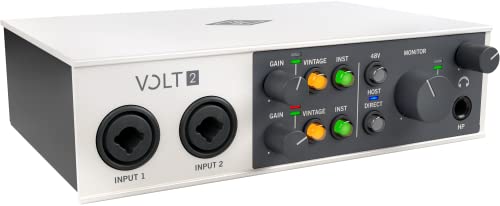
- 610 preamp emulation with Vintage mode
- 2x2 USB-C interface with MIDI support
- Works with iPad and iPhone using required adapters
Best For: Mobile creators wanting UA-style tone
Ultra-Portable Guitar Adapter
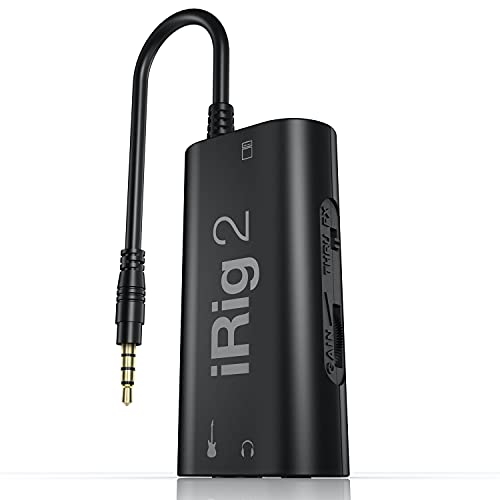
- Plug-and-play guitar interface for iPad and iPhone
- Headphone output and amp output built in
- Processed or clean thru signal switching
Best For: Guitarists wanting a simple mobile adapter
Budget Studio Starter
Focusrite Scarlett Solo 3rd Gen

- 1 XLR mic preamp and 1 Hi-Z instrument input
- 24-bit/192kHz recording with Air mode
- Includes software and plugin bundle
Best For: Beginners needing a reliable solo interface
Portable Pocket Pick
Compact Guitar Interface for iPad Livestreaming

- Plug-and-play with no batteries required
- Lightning to Type-C adapter supports iPad use
- 24-bit/48kHz recording with headphone monitoring
Best For: Beginners who need a tiny, simple iPad guitar interface
Road-Ready Guitar Link
IK Multimedia iRig USB for iPad

- USB-C connection works with iPad and iPhone 15
- Headphone output with direct monitoring
- Dedicated Amp Out with FX or THRU modes
Best For: Guitarists who want simple iPad recording plus amp output
Creator Routing Pick
MAONO P1 for iPad Music Recording
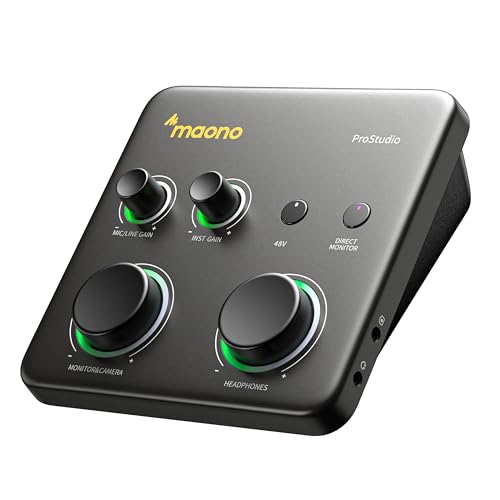
- Dual USB ports support computer and iPad at the same time
- Up to 70dB gain with 24-bit/192kHz recording
- Loopback, auto gain, and direct monitoring included
Best For: Solo creators who need recording, streaming, and routing
Mobile Stereo Capture

- 24-bit stereo RCA input for external gear
- Direct monitoring with no latency or echo
- Loopback and level LED for easier setup
Best For: iPad musicians needing simple stereo recording and streaming
Guitar Practice Pick
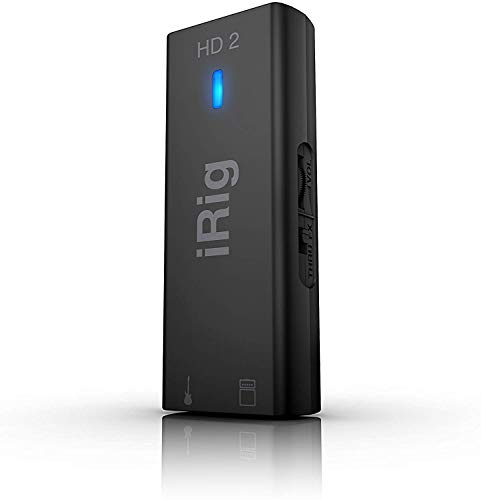
- Hi-Z guitar input with 96kHz recording
- Amp out plus FX/Thru switching
- Headphone level control for silent practice
Best For: Guitar-focused iPad recording and practice
Compact Songwriter Interface – Focusrite Scarlett Solo 4th Gen
If you want audio interfaces for ipad musicians that keep a simple setup but still sound polished, the Scarlett Solo 4th Gen is a strong fit. It gives you one XLR mic preamp and one Hi-Z instrument input, plus 24-bit/192kHz recording and Focusrite’s updated Air mode for added vocal and guitar presence.
Best For: Singers, guitarists, and solo creators who want a straightforward iPad-compatible interface with studio-style sound.
Pros:
- 1 XLR mic preamp and 1 Hi-Z instrument input for basic solo recording
- 24-bit/192kHz conversion with a 120dB dynamic range
- Improved Air mode adds musical presence and harmonic drive
- Includes Pro Tools Intro+, Ableton Live Lite, Cubase LE, and Hitmaker Expansion
Cons:
- Only one mic input and one instrument input
- No MIDI connectivity listed
- Best suited to smaller recording setups rather than multi-input tracking
Overall, this is a practical pick if you need a compact interface for writing, recording, and mixing on iPad without extra complexity. It focuses on clean capture, easy workflow, and enough included software to get started quickly.
Vintage-Toned Mobile Pick – Universal Audio Volt 2
Among audio interfaces for ipad musicians, the Volt 2 stands out if you want a more characterful front end and mobile-friendly flexibility. It offers 2×2 USB-C connectivity, UA’s classic 610 preamp emulation in Vintage mode, and support for iPad and iPhone recording with the required external power setup.
Best For: iPad musicians who want a compact interface with tube-style coloration and MIDI support.
Pros:
- 610 preamp emulation with Vintage mode for a fuller sound
- Up to 24-bit/192kHz recording with crystal clear converters
- MIDI support for integrating controllers and gear
- Works with Mac, Windows, iPad, and iPhone with the required adapter/power setup
Cons:
- Requires an external Volt power supply for iPad/iPhone use
- Lightning iPads need an Apple Lightning to USB Camera Adapter
- Less plug-and-play on mobile than simpler bus-powered options
This is a good choice if you value tonal character and want an interface that can move between desktop and mobile recording. The Volt 2 aims at a polished, album-ready workflow rather than the most minimal iPad setup.
Ultra-Portable Guitar Adapter – IK Multimedia iRig 2
If you mainly need a lightweight option for audio interfaces for ipad musicians, the iRig 2 is built for quick guitar recording and practice. It’s designed for iPhone, iPad, and iPod touch with plug-and-play simplicity, plus a switchable clean thru path and outputs for headphones or an amplifier.
Best For: Guitar players who want a simple mobile interface for practicing, recording, and live-style use on iPad.
Pros:
- Plug-and-play setup with adjustable gain
- 1/4-inch output jack lets you connect to an amplifier without extra accessories
- Built-in headphone output for private monitoring
- Switchable processed or clean thru input for flexible use
Cons:
- Focused on guitar/instrument use rather than full studio recording
- Newer iOS devices may need an Apple USB-C to 3.5mm adapter
- No mic preamp or multi-input recording features listed
This is the most stripped-down option in the group, but that simplicity is the point. For guitar-centric iPad setups, it’s an easy way to get audio in and out without adding much weight or complexity.
Budget Studio Starter – Focusrite Scarlett Solo 3rd Gen
The Scarlett Solo 3rd Gen remains a sensible option for audio interfaces for ipad musicians who want a proven entry-level setup. It includes one XLR mic preamp, one Hi-Z instrument input, 24-bit/192kHz recording, and Air mode for extra clarity on vocals and acoustic instruments.
Best For: Beginners and solo performers who want a reliable iPad-compatible interface with basic studio features.
Pros:
- 1 XLR mic preamp and 1 Hi-Z instrument input for simple recording
- 24-bit/192kHz converters for studio-quality capture
- Air mode adds extra clarity to acoustic instruments
- Includes recording software and plugin bundle
Cons:
- Older 3rd Gen model with lower gain range than the newer version
- Only two channels, so it is not meant for larger sessions
- Best for basic solo tracking rather than expanded studio needs
For iPad musicians who want a dependable interface without spending on extras, this model still covers the essentials well. It’s especially attractive if you want a familiar Focusrite workflow and a straightforward path into recording.
Portable Pocket Pick – Compact Guitar Interface for iPad Livestreaming
If you want simple audio interfaces for ipad musicians, this pocket-sized option is built for quick plug-and-play recording and live streaming. It supports iPad and iPhone use through the included Lightning to Type-C adapter, and it keeps the workflow straightforward with low-latency digital audio processing, 24-bit/48kHz recording, and basic monitoring controls.
Best For: Beginners who want a tiny, easy-to-use interface for guitar or bass on iPad.
Pros:
- Plug-and-play design with no batteries required
- Includes Lightning to Type-C adapter for iPad and iPhone use
- 24-bit/48kHz recording with low-latency monitoring
- 3.5mm headphone output and volume adjustment controls
Cons:
- Only records audio and does not offer edit or mix functions
- Focused on basic use rather than advanced studio routing
- Compact controls may be less flexible than larger interfaces
This is a practical pick if you mainly need a portable interface for simple mobile recording or livestreaming. Its back-clip design and broad compatibility make it easy to carry, but its feature set stays intentionally minimal.
Road-Ready Guitar Link – IK Multimedia iRig USB for iPad
Among audio interfaces for ipad musicians, the IK Multimedia iRig USB is a strong choice if you want a straightforward guitar interface with proper monitoring and amp integration. It uses USB-C for iPad compatibility, delivers 24-bit/48kHz recording, and adds a headphone output plus a dedicated Amp Out with FX or THRU switching for practice or pedal-rig use.
Best For: Guitar players who want a portable iPad interface with direct monitoring and amp output.
Pros:
- 24-bit/48kHz audio for clean recording
- USB-C connection works with iPad, Mac, PC, and iPhone 15
- Headphone output and direct monitoring for silent practice
- Dedicated Amp Out with FX or THRU settings
Cons:
- Does not work properly with a lightning cable
- Designed around guitar use rather than multi-input production
- Included software is geared toward IK’s ecosystem of apps and plug-ins
For musicians who want a compact and durable interface that is easy to connect and quick to use, this model keeps the essentials in focus. It is especially appealing if you want to move between iPad practice, desktop recording, and amp-based setups without a lot of extra gear.
Creator Routing Pick – MAONO P1 for iPad Music Recording
If you need audio interfaces for ipad musicians that can handle recording, streaming, and routing in one box, the MAONO P1 stands out for its hybrid connectivity and software tools. It supports simultaneous computer and phone or iPad connections, offers up to 70dB gain, and adds loopback, auto gain, and direct monitoring for flexible mobile music workflows.
Best For: Solo creators who want one interface for iPad recording, streaming, and routing.
Pros:
- Dual USB ports with MFi-certified connectivity for computer and iPad/phone use
- Up to 70dB gain and 24-bit/192kHz recording quality
- Auto gain, loopback, and direct monitoring for streamlined workflows
- ProStudio2 routing software supports channel control and added effects
Cons:
- Feature set is more complex than a basic guitar interface
- Best value depends on whether you need routing and streaming tools
- Desk-focused design may be less pocketable than smaller mobile units
This interface makes sense if you want more than basic capture and prefer a device built for modern creator workflows. Its combination of routing, monitoring, and gain control should suit iPad musicians who also stream, podcast, or record layered content.
Mobile Stereo Capture – iRig Stream stereo interface
If you want audio interfaces for ipad musicians that can also handle streaming and content creation, the iRig Stream is built around simple stereo capture. It connects mixers, keyboards, audio players, and other studio gear through RCA inputs, then sends 24-bit audio to iPhone, iPad, Mac, or PC. Direct monitoring and easy level control make it a practical choice when you need to record or stream quickly without fighting latency.
Best For: iPad musicians who want a compact stereo interface for recording, streaming, and jamming with external gear.
Pros:
- 24-bit stereo recording with RCA inputs for mixers, keyboards, and players
- Direct monitoring through the headphone output helps avoid latency and echo
- Loopback support makes it easy to play along with music on your device
- Global audio level LED helps with quick gain setup
Cons:
- Uses RCA inputs rather than XLR or 1/4-inch instrument connections
- Focused on stereo capture, so it is less flexible for multi-input studio setups
Overall, the iRig Stream is a smart pick if your iPad workflow centers on stereo sources, livestreams, or simple mobile recording. It keeps the setup small while still offering direct monitoring and broad app compatibility.
Hybrid Creator Hub – MAONO P2 dual XLR interface
Among audio interfaces for ipad musicians, the MAONO P2 stands out if you want one device that can handle recording and mobile posting without changing your setup. Its dual USB ports can connect a computer and phone or iPad at the same time, while dual XLR support, loopback, and direct monitoring make it useful for vocals, guitar, podcasts, and streaming. The onboard controls and routing software are aimed at creators who want more control over their signal path.
Best For: iPad musicians and creators who need dual XLR inputs, routing control, and hybrid phone/computer workflows.
Pros:
- Dual XLR inputs with 56dB gain and 24-bit/192kHz recording
- Dual USB ports support simultaneous computer and phone or iPad connections
- Loopback, mute controls, and direct monitoring help with streaming and recording
- ProStudio 2 software adds routing, VST effects, and noise reduction options
Cons:
- Software routing features may be more than casual users need
- Designed more for creator workflows than for ultra-minimal mobile rigs
For iPad musicians who also stream, teach, or create content, the P2 offers a strong mix of flexibility and control. It is especially appealing if you want XLR mic support plus the ability to route audio across devices with fewer workflow interruptions.
Guitar Practice Pick – iRig HD 2 high-def interface
If your search for audio interfaces for ipad musicians is mainly about guitar recording and silent practice, the iRig HD 2 keeps things focused and portable. It offers a high-quality Hi-Z 1/4-inch input for guitar, USB connectivity for iPad and other devices, and a 96kHz sampling rate. The amp out, FX/Thru switching, and headphone output with level control make it easy to practice, record, and monitor without extra accessories.
Best For: Guitarists using an iPad for practice, direct recording, and amp-style monitoring.
Pros:
- High-definition 96kHz audio with a Hi-Z instrument input
- 1/4-inch amp out with FX/Thru switching for flexible monitoring
- Headphone output includes preamp and level control for silent practice
- Compact, lightweight design is easy to carry in a gig bag
Cons:
- Single-channel design is best for one instrument at a time
- Primarily centered on guitar and instrument use rather than broader studio routing
The iRig HD 2 is a straightforward option if you want a guitar-first interface for iPad-based playing and recording. It prioritizes plug-and-play simplicity, good monitoring options, and portable use over broader multi-input features.
How We Picked the Best Audio Interfaces for Ipad Musicians
We focused on devices that make sense for mobile Apple workflows: solid iPad compatibility, dependable power and connection options, low-latency performance, and features that support music creation rather than just general content capture. We also favored models with practical extras such as gain control, loopback, MIDI, and portable designs.
Quick Comparison
For simple guitar or vocal recording, compact single-input interfaces are usually the easiest choice. If you need more control for streaming, podcasting, or hybrid setups, look for dual inputs, loopback, and stronger routing tools. Some models in this list are especially portable for travel, while others are better suited to home studios that still need iPad compatibility.
Key Buying Factors for Audio Interfaces for Ipad Musicians
Connection Type and Compatibility
Check whether the interface connects through USB-C, Lightning, or standard USB with an adapter. The best choice depends on your iPad model and whether you want a plug-and-play mobile rig or a broader setup that can also work with a Mac or PC.
Inputs, Gain, and Instrument Support
Guitarists and singers should pay attention to input count, preamp quality, and available gain. Higher-gain models can be helpful for dynamic microphones and passive instruments, while instrument-specific interfaces are often simpler for direct recording.
Monitoring and Routing Features
Low-latency monitoring matters when tracking vocals or guitar. If you also stream or record content, loopback and flexible routing can be just as important as raw audio quality. These tools make it easier to combine backing tracks, mic input, and app audio on an iPad.
Portability and Power
Many Audio Interfaces for Ipad Musicians are designed to travel. Lightweight builds, bus power, and cable flexibility can make a big difference if you record in different locations or want a setup that fits in a small bag.
Who Should Buy Which Audio Interfaces for Ipad Musicians?
If you mainly record guitar or voice, a straightforward compact interface is usually the best value. If you need better control for streaming, content creation, or multi-source recording, choose a model with loopback and more routing options. Musicians who want the cleanest possible signal path should prioritize stronger preamps and higher-resolution audio, while casual users may prefer the simplest portable adapter-style interface.
In short, the best choice depends on whether you value mobility, sound quality, or workflow features most. For many buyers, the right iPad interface is the one that disappears into the process and lets the music come first.