The best MIDI interfaces under $300 make it easier to connect keyboards, synthesizers, drum machines, and computers without overspending on studio hardware. This roundup includes straightforward USB adapters, multi-port interfaces, MIDI routing tools, and hybrid audio/MIDI devices.
Use the comparison and buying advice below to match your setup with the right port count, connectivity, routing features, and recording capability.
Best 10 Midi Interfaces Under 300 Picks for 2026
Versatile Studio Hub
ESI M4U eX 8-Port MIDI Interface

- Eight adaptable MIDI ports with LED configuration indicators
- USB 3.0, standalone routing, and integrated USB hub
- Works with Windows and macOS without required drivers
Best For: Complex studios and live MIDI rigs
Reliable MIDI Splitter

- Distributes one MIDI input to five outputs
- Supports full MIDI messages, including clock and MPE
- Compact 5-pin DIN design with USB-C power
Best For: Hardware rigs needing dependable MIDI distribution
Recording Starter Pick
M-AUDIO M-Track Duo USB Audio Interface
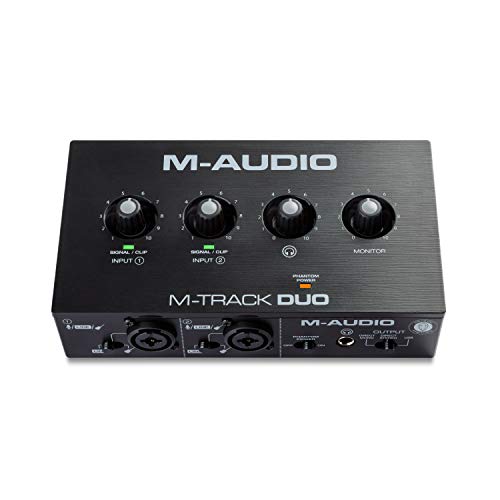
- Two combo microphone, line, and instrument inputs
- Phantom power and zero-latency direct monitoring
- Includes MPC Beats and Ableton Live Lite
Best For: Podcasts, streaming, and basic home recording
Flexible Routing Companion

- Three-in/three-out MIDI with standalone routing
- USB-C support for desktop, mobile, and alternative operating systems
- Merge, split, filter, and map MIDI through UxMIDI Tools
Best For: Configurable keyboard and synth setups
Best Multi-Input MIDI Merger

- Three MIDI inputs and one direct output
- Supports clock, time code, SysEx, and standard MIDI
- Aluminum housing with anti-slip feet
Best For: Combining multiple MIDI sources in hardware
Best Advanced MIDI Router
CME H4MIDI WC USB Host Interface

- Standalone USB host with hub expansion
- Routing, filtering, mapping, split, and merge tools
- USB or 9V DC power with preset storage
Best For: Complex studio, pedalboard, and performance MIDI routing
Best MIDI Splitter for Multiple Outputs
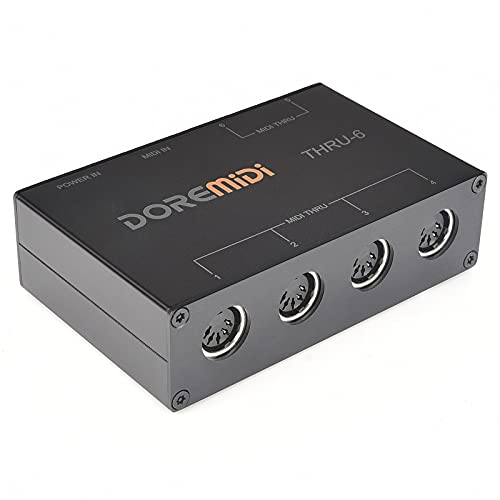
- One MIDI input with six MIDI outputs
- Supports standard MIDI messages and 16 channels
- Plug-and-play USB power with no batteries
Best For: Distributing one MIDI signal to six devices
Best Budget Cable

- 1-in/1-out MIDI connection
- Plug-and-play Windows and Mac support
- LED power and signal indicators
Best For: Basic keyboard-to-computer recording
Best Wireless Option
FORE K1 Wireless MIDI Interface

- Bluetooth MIDI for mobile and computer setups
- Up to 32-foot transmission range
- Supports multiple connection modes
Best For: Cable-free 5-pin MIDI connections
Best for Large Sessions
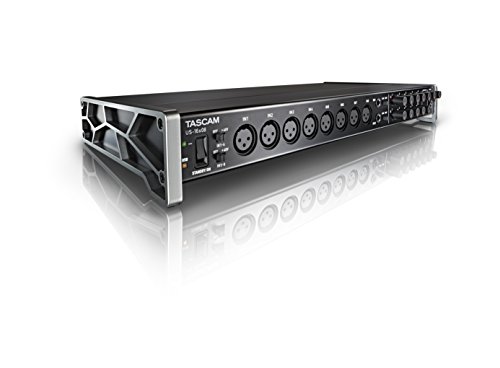
- 16 mic and line inputs
- Eight microphone preamps with up to 56dB gain
- DSP mixer with EQ and compression
Best For: Multitrack drums, bands, and larger studios
Versatile Studio Hub – ESI M4U eX 8-Port MIDI Interface
For musicians comparing MIDI interfaces under 300, the ESI M4U eX stands out when you need extensive routing in a compact, computer-friendly unit. It provides eight adaptable MIDI ports, plug-and-play USB 3.0 connectivity, and an integrated USB hub for expanding a studio setup.
Best For: Home studios, professional setups, and live rigs requiring multiple MIDI connections and standalone routing.
Pros:
- Eight configurable MIDI inputs or outputs with LED status indicators
- USB 3.0 plug-and-play connectivity for Windows and macOS
- Standalone operation with MIDI routing and merging
- Built-in three-port USB hub for connected devices
Cons:
- Larger and more feature-rich than needed for simple one-device setups
- Advanced Windows multi-client functionality uses an optional driver
The M4U eX is a strong choice when scalability matters. Its flexible port configuration and standalone capabilities make it particularly useful for complex studio or performance systems.
Reliable MIDI Splitter – CME MIDI Thru5 WC MIDI Thru
CME MIDI Thru5 WC 1-in-5-out MIDI Thru | 5-pin DIN, High-speed, Optional Bluetooth
Check Price On AmazonAmong MIDI interfaces under 300, the CME MIDI Thru5 WC is a focused solution for sending one MIDI signal to five devices. Its five-pin DIN design, USB-C power, and high-speed optocoupler prioritize dependable synchronization without adding computer-based routing.
Best For: Studio and stage setups that need to distribute one MIDI source to multiple hardware devices.
Pros:
- One MIDI input feeds five MIDI outputs
- Supports notes, controllers, clock, SysEx, timecode, and MPE
- Compact, lightweight enclosure suited to pedalboards and crowded setups
- USB-C power helps avoid ground-loop issues through optocouplers
Cons:
- USB connection provides power only, not MIDI data
- Does not offer computer MIDI interfacing or configurable routing
The Thru5 WC is best understood as a dedicated hardware MIDI distributor rather than a traditional USB interface. Choose it when straightforward, low-latency signal duplication is the main requirement.
Recording Starter Pick – M-AUDIO M-Track Duo USB Audio Interface
If your search for MIDI interfaces under 300 also includes recording audio, the M-AUDIO M-Track Duo is a versatile two-channel USB audio interface. It combines dual combo inputs, phantom power, direct monitoring, and bundled production software for microphones, guitars, and line-level sources.
Best For: Beginners, podcasters, streamers, and musicians recording vocals or instruments on Mac or PC.
Pros:
- Two combo XLR, line, and instrument inputs
- Phantom power supports condenser microphones
- USB/direct monitoring switch enables zero-latency monitoring
- Includes MPC Beats and Ableton Live Lite software
Cons:
- This is an audio interface, not a dedicated MIDI DIN interface
- Maximum sample rate is 48 kHz
The M-Track Duo is a sensible choice for recording and streaming rather than hardware MIDI routing. Its flexible inputs and monitoring options make it useful for a compact audio workstation.
Flexible Routing Companion – CME U6MIDI Pro 3-in-3-out
For musicians evaluating MIDI interfaces under 300, the CME U6MIDI Pro offers a compact balance of computer connectivity and hardware routing. Its three-in/three-out MIDI design supports merging, splitting, filtering, and mapping across major desktop and mobile operating systems.
Best For: Keyboardists, synth users, and mobile or computer-based rigs needing configurable MIDI routing.
Pros:
- Three MIDI inputs and three MIDI outputs with standalone operation
- USB-C plug-and-play support across major desktop and mobile operating systems
- Router, filter, merge, split, and mapping functions via UxMIDI Tools
- Supports broad MIDI message types, including SysEx, timecode, and MPE
Cons:
- Advanced configuration requires the UxMIDI Tools software
- Only includes MIDI connectivity, with no audio inputs or outputs
The U6MIDI Pro is a strong fit for flexible hardware and mobile MIDI systems. Its small footprint and routing features provide more control than a basic computer MIDI adapter without requiring a large interface.
Best Multi-Input MIDI Merger – MERGE-3 MIDI Merge Interface
For shoppers comparing midi interfaces under 300, the MERGE-3 is a straightforward hardware solution for combining multiple MIDI sources. It provides three MIDI inputs, one direct MIDI output, and USB connectivity without requiring software-specific setup.
Best For: Combining three MIDI input devices with direct hardware routing.
Pros:
- Three MIDI inputs and one direct MIDI output
- Supports standard MIDI commands, MIDI clock, MIDI time code, and SysEx
- Compatible with Android, Linux, Windows, iOS, and macOS
- Durable aluminum-alloy construction with anti-slip silicone feet
Cons:
- Provides only one direct MIDI output
- USB connectivity is listed, but the notes do not specify advanced routing or filtering controls
The MERGE-3 focuses on reliable, low-complexity MIDI merging. It is a practical choice when you need several inputs combined in hardware rather than a feature-heavy routing interface.
Best Advanced MIDI Router – CME H4MIDI WC USB Host Interface
Among midi interfaces under 300, the CME H4MIDI WC stands out for advanced routing and standalone USB-host functionality. It can connect USB MIDI instruments without a computer, while also supporting computer, mobile, and tablet workflows through USB-C.
Best For: Producers, guitarists, and performers who need flexible MIDI routing in compact setups.
Pros:
- Standalone USB host supports up to eight USB MIDI device ports through a hub
- Offers MIDI thru, split, merge, mapper, and filter functions
- Works with macOS, Windows, iOS, Android, Linux, and ChromeOS
- Supports USB or 9V DC standalone power and four stored presets
Cons:
- Optional WIDI Bluetooth MIDI requires an additional WIDI Core module
- Advanced configuration depends on the HxMIDI Tools software
- Its broad feature set may be more than basic MIDI setups require
The H4MIDI WC is the most versatile option in this group for routing, filtering, and connecting USB MIDI gear without a computer. Its compact format and dual-power design also suit pedalboards and mobile rigs.
Best MIDI Splitter for Multiple Outputs – MIDI Thru-6 USB Interface
For a simple option among midi interfaces under 300, the MIDI Thru-6 Box sends one incoming MIDI signal to six outputs. It is designed for plug-and-play use, making it useful when one controller or synthesizer needs to feed several MIDI devices at once.
Best For: Sending one MIDI source to up to six connected devices.
Pros:
- One MIDI input feeds six MIDI Thru outputs
- Transmits all standard MIDI messages across 16 channels
- USB-powered with no batteries required
- Designed for smooth, low-interference signal transmission
Cons:
- It only splits one input rather than merging multiple MIDI sources
- Requires a 5V DC USB power supply
- Does not list advanced routing, filtering, or mapping features
The MIDI Thru-6 Box is a focused distribution tool rather than a full MIDI router. Choose it when your main requirement is dependable one-to-six output expansion for synths, controllers, or other MIDI hardware.
Best Budget Cable – LEKATO USB MIDI Cable
If you need a straightforward option among midi interfaces under 300, the LEKATO USB MIDI Cable connects a keyboard, piano, or synthesizer to a Windows or Mac computer. Its 1-in/1-out design, plug-and-play setup, and status LEDs make it a practical choice for basic editing and recording.
Best For: Home recording and direct computer connections with 5-pin MIDI instruments.
Pros:
- Plug-and-play compatibility with Windows and macOS.
- LEDs show power and MIDI signal activity.
- Supports 16 input and output channels with low-latency transmission.
- Soft bare-copper cable and electromagnetic-interference resistance support stable signaling.
Cons:
- Provides only one MIDI input and one MIDI output.
- It is a cable-style interface rather than a full audio interface.
The LEKATO is best when simplicity matters more than extensive routing or multiple connections. It offers the essential USB-to-MIDI link without requiring a separate driver installation.
Best Wireless Option – FORE K1 Wireless MIDI Interface
For musicians comparing midi interfaces under 300 who want less cable clutter, the FORE K1 adds wireless Bluetooth MIDI connectivity to compatible 5-pin DIN devices. It supports iOS, Android, Mac, and Windows setups, while the included USB-connected unit can add wireless access to computers without built-in wireless MIDI support.
Best For: Wireless connections between MIDI keyboards, synthesizers, electronic drums, mobile devices, and computers.
Pros:
- Wireless transmission with stated latency as low as 3ms.
- Supports iOS, Android, macOS, and Windows systems.
- Offers up to 32 feet or 10 meters of transmission distance.
- Works with major MIDI software including GarageBand, FL Studio, and Cubase.
Cons:
- iOS and iPad connections require an app-based Bluetooth MIDI setup.
- Using the computer-focused configuration requires the included MIDI B USB unit.
- Wireless operation depends on compatible 5-pin DIN equipment and pairing.
The FORE K1 is a flexible choice for a cleaner studio or performance setup. Its multiple operating modes are useful, but buyers should follow the pairing steps and confirm their device has a 5-pin MIDI port.
Best for Large Sessions – Tascam US-16×08 USB Interface
The Tascam US-16×08 is a substantially larger recording interface for shoppers exploring midi interfaces under 300 alongside extensive audio I/O. It combines USB connectivity with 16 mic and line inputs, eight outputs, eight microphone preamps, and DSP-based monitor mixing for bigger recording sessions.
Best For: Drum recording, band tracking, and studios needing many simultaneous mic and line inputs.
Pros:
- Captures 16 mic and line inputs at up to 96 kHz.
- Eight Ultra-HDDA microphone preamps provide up to 56dB of gain.
- Eight balanced line outputs support larger monitoring and routing setups.
- Built-in DSP mixer includes four-band EQ and compression on each channel.
Cons:
- Its 6.1-pound rackmount design is much less portable than a simple MIDI cable.
- The supplied details list Windows operating-system support.
- It may offer more audio I/O than needed for a basic single-keyboard setup.
The US-16×08 makes sense when MIDI is part of a broader multitrack recording workflow. Its extensive inputs, outputs, and DSP monitoring features are better suited to drum tracking or ensemble sessions than casual MIDI editing.
How We Picked the Best Midi Interfaces Under 300
We focused on practical connectivity, compatibility, port configuration, ease of use, and the types of setups each interface supports. The selection spans simple one-device USB cables, multi-output MIDI splitters, computer-connected interfaces, wireless options, and audio interfaces with built-in MIDI I/O.
We also considered whether a product is useful for a beginner, a compact performance rig, or a larger hardware-based studio. Because MIDI needs vary widely, port count and routing flexibility matter as much as price.
Quick Comparison
| Best For | Look For |
|---|---|
| Connecting one keyboard to a computer | USB MIDI cable with input and output |
| Several hardware instruments | Multiple MIDI inputs and outputs |
| Sending one source to many devices | MIDI thru or splitter outputs |
| Computer-free routing | Standalone operation and stored routing |
| Recording microphones and instruments too | Combined audio/MIDI interface |
| Minimal cable clutter | Wireless MIDI connectivity |
Key Buying Factors for MIDI Interfaces Under $300
Port Count and Direction
Check how many MIDI inputs and outputs you actually need. A single input and output can handle one keyboard, while a multi-port interface is better for synthesizers, drum machines, and external sequencers. Remember that a MIDI thru output duplicates incoming data; it is not the same as an independently addressable MIDI output.
Routing and Standalone Use
If you want to control hardware without keeping a computer connected, choose an interface with standalone functionality or dedicated routing controls. Basic USB adapters are simpler and cheaper, but they generally depend on the computer for configuration and operation.
USB Compatibility and Power
Class-compliant, plug-and-play designs are convenient for modern computers, though you should still verify operating-system and connector compatibility. USB-powered devices reduce the need for another adapter, while larger rack or desktop units may require external power.
Audio Features
A MIDI interface does not replace an audio interface. If you also need microphone preamps, line inputs, headphone monitoring, or multiple recording channels, a hybrid audio/MIDI model can provide better overall value than buying separate units.
Wireless Convenience
Wireless MIDI can be useful for compact keyboard setups and live control, but wired connections are usually the safer choice for permanent studio routing and longer cable runs. Confirm that the wireless product supports the devices and operating systems you plan to use.
Who Should Buy Which Midi Interfaces Under 300?
Choose a USB MIDI cable if you only need to connect one keyboard or synthesizer to a computer. Pick a multi-port interface if your studio includes several hardware instruments or you need independent routing. A MIDI thru box is the right fit when one controller must feed multiple destinations simultaneously.
Consider a combined audio/MIDI interface if you record vocals, microphones, guitars, or drum sources alongside MIDI instruments. For mobile or uncluttered setups, a wireless option may be worthwhile. Before ordering, map every device in your signal chain and count inputs, outputs, and thru connections; that simple step helps ensure the interface you choose will support both your current rig and likely next upgrade.