The best MIDI interface for a live rig should make every connection predictable, from a single keyboard to a hardware-heavy performance setup. The right choice depends on your device count, required I/O, computer connection, and need for audio recording.
We selected 10 options spanning dedicated MIDI adapters, USB MIDI controllers, and audio interfaces with MIDI connectivity. Use the guide below to narrow the list by workflow, portability, and expansion needs.
Best 10 Midi Interfaces for Live Performances Picks for 2026
Best Routing Choice
CME U6MIDI Pro 3-in-3-out MIDI Interface

- Standalone 3-in-3-out MIDI routing
- Near-zero latency and no jitter
- Broad OS and MIDI-format support
Best For: Performers managing multiple keyboards, synths, and MIDI devices
Best Audio-and-MIDI Hub
Focusrite Scarlett 4i4 4th Gen

- MIDI I/O plus 4-in/4-out audio
- Two mic preamps and two Hi-Z inputs
- 24-bit/192kHz with 120dB dynamic range
Best For: Hybrid live rigs using MIDI and multiple audio sources
Best Pad Controller
Akai Professional LPD8 USB MIDI Pad Controller

- Eight RGB-backlit performance pads
- Eight assignable control knobs
- Compact USB-powered Mac/PC design
Best For: Portable beat triggering and hands-on DAW control
Best Compact Audio Interface
Focusrite Scarlett 2i2 4th Gen

- Two mic preamps and two Hi-Z inputs
- 24-bit/192kHz audio with 120dB dynamic range
- Auto Gain, Clip Safe, and Air modes
Best For: Solo performers needing straightforward computer-based audio
Hands-On DAW Control

- Eight faders and 24 assignable knobs
- Mute, solo, and record-arm buttons
- Ableton Live mapping included
Best For: Laptop-based performers needing tactile DAW mixing
Portable Audio I/O
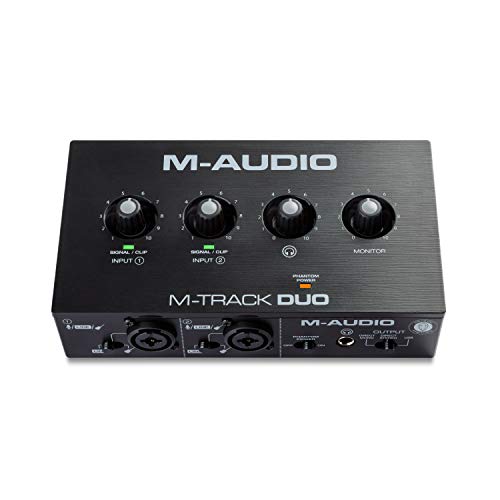
- Two combo XLR/line/instrument inputs
- Phantom power and zero-latency monitoring
- Headphone and stereo main outputs
Best For: Small performance setups needing flexible audio inputs
Reliable MIDI Connectivity

- 2-meter USB-to-MIDI cable
- Supports up to 32 MIDI inputs or outputs
- Plug-and-play PC and Mac operation
Best For: Hardware MIDI rigs needing extended USB connectivity
Best Compact Audio Hub
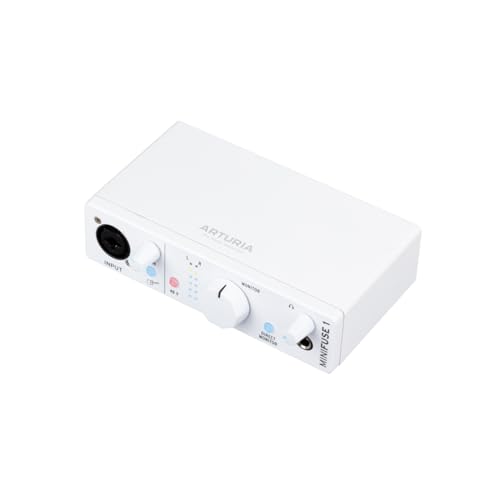
- 5-pin MIDI input and output
- Combo mic/instrument input with 48V phantom power
- 5-year warranty and bundled creative software
Best For: Solo performers and compact synth-based rigs
Best Simple MIDI Cable Interface
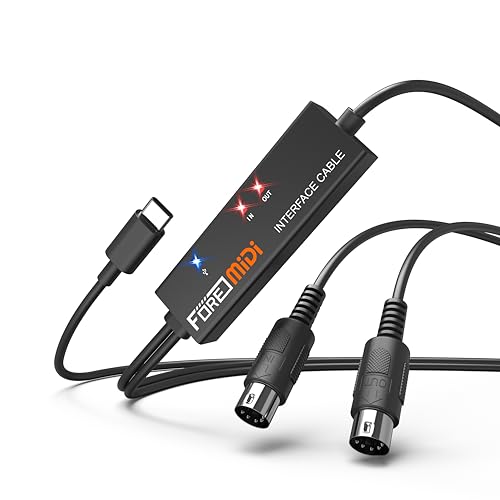
- One 5-pin MIDI input and output
- Plug-and-play with LED status indicators
- Works with mobile and desktop operating systems
Best For: Single-keyboard or drum-machine MIDI connections
Best 2x2 Audio and MIDI Interface

- 2-in/2-out audio with MIDI I/O
- Two mic preamps with 48V phantom power
- Zero-latency monitoring and bus-powered USB
Best For: Small live rigs combining microphones, instruments, and MIDI gear
Best Routing Choice – CME U6MIDI Pro 3-in-3-out MIDI Interface
For performers comparing MIDI interfaces for live performances, the CME U6MIDI Pro stands out when dependable routing and broad device compatibility matter. It provides three MIDI inputs and outputs, near-zero-latency transmission, and configurable split, merge, thru, and filtering functions.
Best For: Live keyboardists and electronic musicians who need flexible MIDI routing, filtering, and reliable synchronization.
Pros:
- Standalone 3-in-3-out MIDI operation with router and filter functions.
- Works with macOS, iOS, Windows, Android, Linux, and Chrome OS.
- Supports MIDI clock, SysEx, MIDI Time Code, MPE, and all MIDI channels.
- Compact, lightweight design with plug-and-play USB-C connectivity.
Cons:
- It handles MIDI only, not audio inputs or outputs.
- Advanced routing configuration requires compatible UxMIDI Tools software.
The U6MIDI Pro is a focused choice for complex live rigs. Its standalone routing and filtering make it more flexible than a basic computer MIDI connection, while its small footprint suits portable setups.
Best Audio-and-MIDI Hub – Focusrite Scarlett 4i4 4th Gen
The Scarlett 4i4 4th Gen is a strong option for musicians who need more than MIDI when choosing MIDI interfaces for live performances. Alongside MIDI I/O, it offers four inputs, four outputs, mic preamps, Hi-Z instrument inputs, and studio-grade 24-bit/192kHz audio support.
Best For: Live performers who combine MIDI keyboards or synths with microphones, guitars, drum machines, and other audio gear.
Pros:
- Includes MIDI input and output plus four line inputs and four line outputs.
- Two mic preamps and two Hi-Z instrument inputs support varied stage setups.
- 120dB dynamic range and up to 192kHz sample-rate capability.
- Auto Gain, Clip Safe, and Air modes add practical performance and recording controls.
Cons:
- Larger and heavier than a dedicated MIDI-only interface.
- Requires USB connectivity and included power arrangements rather than standalone MIDI routing.
Choose the Scarlett 4i4 when your live rig needs both audio capture and MIDI connectivity. It is especially useful for compact hybrid setups, though it offers less specialized MIDI routing than the CME interface.
Best Pad Controller – Akai Professional LPD8 USB MIDI Pad Controller
The Akai LPD8 is a compact performance controller rather than a traditional MIDI interface, but it can be useful alongside MIDI interfaces for live performances. Its eight RGB-backlit pads and eight assignable knobs provide hands-on control for samples, loops, instruments, effects, and DAW parameters.
Best For: DJs, beat makers, and performers who want portable pad triggering and tactile software control.
Pros:
- Eight responsive RGB-backlit MPC-style pads for triggering sounds and clips.
- Eight assignable Q-Link knobs support hands-on parameter control.
- Four programmable presets allow quick recall of custom mappings.
- USB-powered, plug-and-play operation with Mac and PC.
Cons:
- It is a USB pad controller, not a multi-port 5-pin MIDI interface.
- Computer-based operation may not suit standalone hardware rigs.
- Its eight pads provide less triggering space than larger pad controllers.
The LPD8 makes sense as a compact performance-control add-on. Pair it with a suitable MIDI or audio interface when you need physical triggers and knobs, but do not choose it as your primary hardware MIDI routing hub.
Best Compact Audio Interface – Focusrite Scarlett 2i2 4th Gen
The Scarlett 2i2 4th Gen is suited to performers who need a simple, portable audio interface for a MIDI-based setup. It focuses on two mic preamps and two Hi-Z instrument inputs, with 24-bit/192kHz recording, Auto Gain, Clip Safe, and Air modes.
Best For: Solo performers and small live setups using a MIDI controller or keyboard alongside one or two audio sources.
Pros:
- Two mic preamps and two Hi-Z inputs cover vocals, guitars, and instruments.
- Offers 120dB dynamic range and up to 24-bit/192kHz audio.
- Auto Gain and Clip Safe help simplify level management.
- Includes broad recording software and plugin bundles.
Cons:
- It has fewer inputs and outputs than the Scarlett 4i4.
- The supplied notes do not list MIDI input or output.
- It is designed around computer-connected audio rather than standalone MIDI routing.
The 2i2 is a practical entry point for a streamlined performance rig, especially when audio is the priority. If your setup requires dedicated hardware MIDI connections or more simultaneous line sources, consider a MIDI-focused interface or the larger 4i4 instead.
Hands-On DAW Control – Compact MIDI Mixer
The Akai Professional MIDImix is a practical choice among midi interfaces for live performances when you need immediate, hands-on control over mixer settings, effects, and virtual instruments. Its compact metal design combines faders, knobs, and buttons in a portable USB controller.
Best For: Performers and producers who want compact Ableton Live and DAW mixing control.
Pros:
- Eight channel faders plus a master fader provide direct volume control.
- Twenty-four assignable knobs handle EQ, sends, instruments, and effects.
- Sixteen buttons support mute, solo, and record-arm functions.
- Offers instant one-to-one Ableton Live mapping, with Ableton Live Lite included.
Cons:
- It is a MIDI mixer/controller rather than an audio interface with microphone inputs.
- Its USB connection requires a computer or compatible host setup.
The MIDImix stands out when tactile DAW control matters more than audio capture. It is especially useful for compact performance rigs built around a laptop and Ableton Live.
Portable Audio I/O – M-Track Duo USB Interface
The M-AUDIO M-Track Duo is a straightforward option among midi interfaces for live performances when your setup also needs microphone, instrument, or line-level audio connections. Its two combo inputs, phantom power, and direct monitoring support recording, streaming, and performance use.
Best For: Solo performers and small rigs connecting microphones, guitars, keyboards, or line sources to a computer.
Pros:
- Two combo XLR/line/instrument inputs accommodate varied sources.
- Phantom power supports compatible condenser microphones.
- USB/Direct switching enables zero-latency monitoring.
- Includes headphone and stereo main outputs for flexible monitoring.
Cons:
- It provides two audio channels rather than dedicated MIDI DIN connections.
- Its maximum sample rate is 48 kHz.
The M-Track Duo is best viewed as a compact audio hub rather than a traditional MIDI controller. It makes sense when live performance requires dependable audio input and monitoring alongside computer software.
Reliable MIDI Connectivity – MIDIMATE eX USB Cable
The ESI MIDIMATE eX is a simple, extended-reach solution among midi interfaces for live performances, linking MIDI keyboards, synthesizers, and other DIN-equipped gear to a PC, Mac, iPad, or iPhone. Its 2-meter cable is plug-and-play and designed for demanding studio or performance use.
Best For: Performers connecting external MIDI hardware to a computer or mobile device.
Pros:
- Two-meter length gives a performance setup extra placement flexibility.
- Supports up to 32 MIDI inputs or outputs for extensive setups.
- Plug-and-play operation works with PC and Mac without required drivers.
- Optional Windows driver supports multi-device and multi-client operation.
Cons:
- It provides MIDI connectivity, not audio inputs, outputs, or monitoring.
- The setup requires MIDI DIN-equipped hardware.
The MIDIMATE eX is a focused cable interface for adding reliable MIDI communication without a larger controller. Its reach, broad device compatibility, and two-year warranty make it a useful link for hardware-based rigs.
Best Compact Audio Hub – MiniFuse 1
For performers who need both audio recording and hardware control, the Arturia MiniFuse 1 is a compact option among midi interfaces for live performances. It combines 5-pin MIDI input and output with an instrument/microphone input, balanced outputs, headphone monitoring, and USB connectivity in a small, bus-powered-friendly setup.
Best For: Solo performers, vocalists, guitarists, and compact synth or drum-machine rigs.
Pros:
- Includes 5-pin MIDI input and output for synths, controllers, and drum machines.
- Combo microphone/instrument/line input includes 48V phantom power.
- Loopback, headphone volume control, and balanced outputs support flexible monitoring and recording.
- Comes with Ableton Live Lite, Analog Lab Intro, effects, guitar software, Auto-Tune, and Splice access.
Cons:
- Its single-channel design is less suited to larger multi-microphone live setups.
- The compact I/O layout may be limiting for performers who need several simultaneous audio connections.
The MiniFuse 1 stands out when portability, straightforward operation, and MIDI integration matter more than extensive audio I/O. Its 5-year warranty and tested construction also add reassurance for regular use.
Best Simple MIDI Cable Interface – FORE T1 USB-C MIDI Interface
The FORE T1 is a focused choice for connecting traditional 5-pin MIDI equipment to a computer or mobile device. For midi interfaces for live performances, its plug-and-play design, built-in cables, LED status indicators, and USB-C connection make it useful when you only need MIDI data transfer rather than audio conversion.
Best For: Keyboardists, electronic drummers, and performers connecting one MIDI instrument to a phone, tablet, or computer.
Pros:
- Provides one MIDI input and one MIDI output with 16 channels each.
- Plug-and-play operation requires no additional driver installation.
- LED indicators show power and signal-transfer status.
- Supports iOS, Android, Windows, and macOS devices with compatible connections.
Cons:
- This is a MIDI-only interface and does not provide audio inputs, outputs, or headphone monitoring.
- The USB A-C adapter needed for some Type-A connections is not included.
- It connects one MIDI in/out path rather than offering multiple independent ports.
The T1 makes sense for a streamlined live MIDI setup built around a keyboard, drum machine, or controller. Its role is deliberately narrow, but that can keep cabling and setup simple when audio is handled elsewhere.
Best 2×2 Audio and MIDI Interface – Onyx Producer 2-2
Mackie Audio Interface, Onyx Producer 2X2 USB Audio Interface with MIDI (Onyx Producer 2-2)
Check Price On AmazonThe Mackie Onyx Producer 2-2 is a stronger fit for performers who need simultaneous audio and MIDI connectivity. As midi interfaces for live performances go, it offers 2-in/2-out recording, MIDI I/O, zero-latency direct monitoring, and bus-powered USB operation in a rugged enclosure.
Best For: Singer-songwriters, small live rigs, and performers combining microphones or instruments with external MIDI gear.
Pros:
- Provides 2-in/2-out audio alongside MIDI input and output.
- Two Onyx mic preamps include 48V phantom power for condenser microphones.
- XLR/TRS combo inputs accept microphone, line, and Hi-Z instrument sources.
- Zero-latency direct monitoring includes dedicated monitor outputs and a headphone output.
Cons:
- The interface has only two audio inputs, which may not cover larger ensembles or expanded stage rigs.
- It carries a 1-year warranty, shorter than some compact alternatives.
- The included software collection may be more relevant to recording than to a minimal live-only setup.
The Onyx Producer 2-2 is the most versatile option here for a performer who needs real audio I/O as well as MIDI. Its direct monitoring and bus-powered design are particularly practical for low-latency, mobile performance setups.
How We Picked the Best Midi Interfaces for Live Performances
We focused on the features that matter most on stage: dependable MIDI communication, practical input and output options, easy computer connection, compact designs, and compatibility with common keyboards, controllers, sound modules, and recording software. Because live setups vary widely, this roundup includes dedicated MIDI interfaces as well as audio interfaces that add MIDI ports to a broader performance setup.
We also considered whether each product suits a simple one-controller rig, a laptop-based show, or a more complex arrangement involving several instruments. USB bus power, connector types, portability, and the ability to expand later were important factors.
Quick Comparison
| Best For | What to Look For | Ideal Product Type |
|---|---|---|
| Single keyboard or module | Simple plug-and-play operation | USB-to-MIDI cable or compact interface |
| Several hardware instruments | Multiple independent MIDI inputs and outputs | Dedicated multi-port MIDI interface |
| Live instruments plus vocals | MIDI I/O and microphone or line inputs | USB audio interface with MIDI |
| Portable laptop performances | Bus power, small footprint, and USB-C compatibility | Compact audio/MIDI interface |
| Hands-on beat control | Pads, knobs, and low-latency computer control | USB MIDI controller |
Key Buying Factors for Midi Interfaces for Live Performances
MIDI Ports and Routing
Count the physical MIDI inputs and outputs you need now, then allow room for expansion. One MIDI In and Out may be enough for a keyboard and sound module, while a larger rig benefits from multiple independent ports that avoid constant cable swapping.
Connection and Compatibility
Check whether the interface uses USB-A, USB-C, or an adapter. Confirm operating-system support and make sure your computer, tablet, or hub can provide stable power. For older hardware, standard five-pin MIDI connectors are usually the safest choice.
Audio Requirements
If you only need to send MIDI data, an audio interface may add unnecessary size and cost. If you also perform with microphones, guitars, synthesizers, or backing tracks, an audio interface with MIDI can consolidate your setup and reduce the number of boxes on stage.
Reliability and Latency
Prioritize proven drivers, firm connectors, and a setup that can be tested easily before a show. Low latency matters for software instruments and monitoring, but stable connections and predictable routing matter just as much in a live environment.
Portability and Power
Small bus-powered units are convenient for mobile rigs, while larger interfaces may offer better control and more connections. Use short, secure cables where possible, and consider strain relief if the interface will be moved frequently.
Who Should Buy Which Midi Interfaces for Live Performances?
Choose a dedicated multi-port MIDI interface if you run several keyboards, drum machines, or rack modules and need flexible routing. Choose a USB-to-MIDI cable if you want the simplest connection between one computer and one traditional MIDI device.
A compact USB MIDI controller is better for performers who need pads, knobs, or hands-on software control rather than traditional five-pin routing. For singers, instrumentalists, and electronic musicians who need both recording inputs and MIDI, a 2×2 or 4×4 audio interface with MIDI is generally the most versatile choice.
Before buying, map every device in your signal chain, identify the ports each one requires, and verify your computer connection. For live performances, the best option is usually the simplest interface that provides enough I/O, stable power, and room for your next setup upgrade.