Adding a subwoofer can give a compact monitoring setup the low-end extension it needs for mixing, production, and immersive listening. The right combination depends on your room, monitor size, connections, and how accurately you need to hear bass.
We’ve gathered 10 notable studio monitors, subwoofers, and bundled solutions to help you build a more complete monitoring system without overspending or choosing equipment that overwhelms your space.
Best 10 Studio Monitors with Subwoofer Output Picks for 2026
Best Complete Bundle
Mackie CR3.5 Monitors with CR8SBT Subwoofer

- Complete monitors, subwoofer, remote, and cable bundle
- Bluetooth subwoofer with 40Hz–180Hz crossover
- Tone control, multiple inputs, and headphone output
Best For: Ready-to-use desktop 2.1 audio systems
Best for Professional Connections
JBL LSR310S 10-Inch Studio Subwoofer
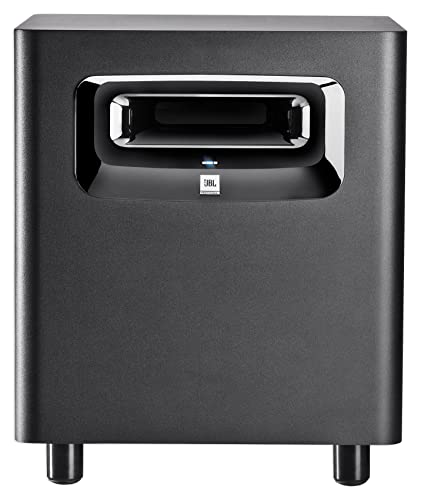
- Balanced XLR and TRS connectivity
- 10-inch driver reaches into the 20Hz region
- Selectable XLF bass tuning and input sensitivity
Best For: Production setups with balanced studio gear
Best Flexible Compact Subwoofer

- 100 watts with response down to 30Hz
- Bluetooth 5.0, TRS, RCA, and auxiliary inputs
- Adjustable filters, tuning controls, and headphone output
Best For: Compact rooms and mixed wired/wireless listening
Best for Yamaha Monitor Matching

- 150-watt amplifier with an 8-inch driver
- 22Hz–150Hz bass-reflex response
- Low-cut, high-cut, and phase controls
Best For: Recording and live-music monitoring systems
Low-End Extension Pick

- 10-inch active subwoofer with 28 Hz response
- Adjustable crossover, phase, and volume controls
- Footswitch bypass for quick mix comparisons
Best For: Extending the low end of ADAM T5V or T7V monitor systems
Compact Connectivity Pick
Ortizan C7 Powered Studio Monitors

- Balanced TRS input for professional gear
- Bluetooth 5.3, USB, RCA, and AUX connectivity
- Compact two-way design with headphone output
Best For: Small desks needing flexible monitoring and playback connections
Professional Subwoofer Control Pick

- 10-inch front-firing driver with 170-watt RMS amplification
- Variable 50–130 Hz low-pass filter and 80 Hz high-pass filter
- Balanced I/O, pass-through outputs, and XLR subwoofer output
Best For: Home and professional studios needing configurable low-end extension
Deep-Bass Upgrade
KRK S8.4 Powered Studio Subwoofer

- 8-inch woofer with bass extension to 30Hz
- 112 dB maximum SPL and 109W Class D power
- Footswitch-ready sub and crossover bypass
Best For: Recording studios and producers needing powerful extended bass
Desktop-Friendly Bass
Mackie CR8SBT Studio Subwoofer

- TRS and RCA connections for CR Series monitors
- Bluetooth input and included desktop remote
- Adjustable crossover for monitor integration
Best For: Desktop CR Series setups needing convenient bass control
Compact Monitor Pair
PreSonus Eris 3.5 Powered Monitors

- Stereo pair with 50W built-in amplification
- TRS, RCA, aux, and headphone connections
- High- and low-frequency acoustic controls
Best For: Small desks and entry-level production or multimedia systems
Best Complete Bundle – Mackie CR3.5 Monitors with CR8SBT Subwoofer
This all-in-one option is a practical starting point for anyone seeking studio monitors with subwoofer output without assembling a system piece by piece. It combines Mackie CR3.5 powered monitors, an 8-inch CR8SBT subwoofer, a desktop volume remote, and a 10-foot RCA cable.
Best For: Buyers who want a ready-to-use 2.1 setup for music, gaming, movies, and casual listening.
Pros:
- Includes monitors, subwoofer, remote, and RCA cable.
- CR3.5 speakers offer tone control and desktop or bookshelf placement modes.
- CR8SBT adds Bluetooth, adjustable crossover from 40Hz to 180Hz, and independent subwoofer-level control.
- Front headphone output automatically mutes the speakers when headphones are connected.
Cons:
- The 3.5-inch monitors are compact and may not provide the output of larger studio monitors.
- The bundle is relatively bulky and heavy compared with a monitor-only setup.
This bundle is the most convenient choice when you need the core components and connectivity in one purchase. Its tone controls, Bluetooth subwoofer, and included remote make it flexible for mixed-use desktop listening.
Best for Professional Connections – JBL LSR310S 10-Inch Studio Subwoofer
The JBL LSR310S is a dedicated 10-inch subwoofer for expanding studio monitors with subwoofer output or balanced studio connections. Its XLR and 1/4-inch TRS inputs, XLR outputs, sensitivity switch, and 20Hz-region low-frequency capability suit more demanding monitoring systems.
Best For: Recording and production setups that use balanced XLR or TRS connections and need extended low-end response.
Pros:
- Provides balanced XLR and 1/4-inch TRS inputs plus XLR outputs.
- 10-inch driver is designed for deep low-frequency response into the 20Hz region.
- XLF setting offers an alternate bass tuning inspired by club systems.
- Sensitivity switch supports both -10dBV and +4dBu signal sources.
Cons:
- This is a subwoofer only; main monitors and connecting cables may need to be purchased separately.
- Its professional balanced connectivity may be more than needed for a basic consumer setup.
Choose the LSR310S when system integration and low-end extension matter more than convenience features. The balanced I/O and sensitivity options make it a strong fit for compatible studio equipment.
Best Flexible Compact Subwoofer – PreSonus Eris Sub 8BT
The PreSonus Eris Sub 8BT is a compact 8-inch choice for studio monitors with subwoofer output, offering wired and wireless input options. Its 100-watt amplifier, 30Hz low-end response, adjustable filters, and tuning controls make it adaptable to music production, gaming, and home listening.
Best For: Compact monitoring spaces that need flexible connectivity, Bluetooth, and adjustable crossover controls.
Pros:
- 8-inch front-firing design delivers response down to 30Hz.
- Bluetooth 5.0 complements balanced 1/4-inch TRS and unbalanced RCA connections.
- Highpass and lowpass controls help blend the subwoofer with main monitors.
- Includes room-tuning controls and a front headphone output with built-in amplifier.
Cons:
- It is a subwoofer rather than a complete monitor system.
- Bluetooth range is listed at 10 meters, so placement and wireless distance remain relevant.
The Eris Sub 8BT stands out for everyday flexibility. It offers enough adjustment to integrate with different monitors while retaining convenient Bluetooth, auxiliary, and headphone features.
Best for Yamaha Monitor Matching – Yamaha HS8S Powered Subwoofer
The Yamaha HS8S is an 8-inch powered subwoofer built for recording and live-music applications. For systems using studio monitors with subwoofer output, it provides a 150-watt amplifier, a 22Hz–150Hz frequency range, XLR connectivity, and controls for low cut, high cut, and phase.
Best For: Yamaha-oriented recording setups that need powerful, adjustable low-frequency support.
Pros:
- 150-watt amplifier supports high-output monitoring applications.
- 8-inch bass-reflex design covers 22Hz to 150Hz.
- Low-cut, high-cut, and phase controls help with system integration.
- Designed for recording and live-music use.
Cons:
- This is a standalone subwoofer, so main monitors are not included.
- Its floor-standing cabinet requires more placement space than a compact desktop subwoofer.
The HS8S is a sensible choice when you want substantial amplifier power and hands-on crossover and phase adjustment. It is particularly suited to users building a dedicated Yamaha-centered monitoring system.
Low-End Extension Pick – ADAM Audio T10S Subwoofer
The ADAM Audio T10S is a practical way to add deeper bass to studio monitors with subwoofer output, especially when paired with ADAM Audio’s T5V or T7V speakers. Its adjustable crossover, phase switch, and dedicated volume control help you integrate the subwoofer into your room and workflow.
Best For: Studio producers who want to extend the low end of compatible ADAM Audio monitors.
Pros:
- 10-inch active subwoofer reaches down to a stated 28 Hz.
- Adjustable crossover, phase rotation, and volume controls support system calibration.
- Downward-facing woofer offers more placement flexibility.
- Footswitch bypass makes it easy to compare mixes with and without bass extension.
Cons:
- Designed specifically to complement ADAM Audio T5V and T7V monitors.
- At 27 pounds, it is not a lightweight desktop accessory.
- It requires a wired, corded-electric setup.
The T10S is a focused choice when accurate low-frequency extension matters more than extra connectivity. Its room-adjustment features and bypass control make it especially useful for checking how bass changes affect a mix.
Compact Connectivity Pick – Ortizan C7 Powered Studio Monitors
The Ortizan C7 is a compact pair of powered monitors for buyers seeking studio monitors with subwoofer output potential alongside flexible everyday connectivity. It combines a 6.35mm TRS balanced input with RCA, AUX, USB, Bluetooth 5.3, and a front headphone output.
Best For: Small creative setups that need monitoring, consumer audio playback, and multiple input options in one pair.
Pros:
- 6.35mm TRS balanced input supports professional audio equipment.
- Bluetooth 5.3, RCA, AUX, and USB connectivity add flexibility.
- 3.5-inch carbon-fiber mid-bass driver and 0.75-inch silk-dome tweeter provide two-way monitoring.
- Front headphone output simplifies alternate monitoring.
Cons:
- The compact 3.5-inch woofer is less suited to very deep bass than a dedicated subwoofer system.
- The supplied details do not identify a dedicated subwoofer output.
- Its listed specific use is gaming, so buyers should verify it meets their production requirements.
The C7 makes the most sense for a compact desk where convenience and input variety are priorities. If your definition of studio monitors with subwoofer output requires a dedicated sub connection, confirm the rear-panel layout before buying.
Professional Subwoofer Control Pick – PreSonus Eris Pro Sub 10
The PreSonus Eris Pro Sub 10 is built for full-range monitor systems that need substantial low-frequency extension. It works well in setups involving studio monitors with subwoofer output, offering balanced and unbalanced inputs, pass-through outputs, an XLR subwoofer output, and controls for crossover, gain, polarity, and bypass.
Best For: Home and professional studios that need a powerful, configurable 10-inch subwoofer for monitor integration.
Pros:
- 10-inch front-firing driver and 170-watt RMS Class AB amplification.
- Continuously variable 50–130 Hz low-pass filter supports system matching.
- Switchable 80 Hz high-pass filter can remove low content from the main monitors.
- Balanced XLR and TRS inputs, pass-through outputs, and an XLR subwoofer output support expandable systems.
Cons:
- At 37 pounds, it is a substantial floor-standing unit.
- Its 170-watt amplifier and up-to-113 dB SPL capability may be more than needed for a small room.
- The listed warranty is two years.
The Eris Pro Sub 10 is the most configurable option here for integrating a subwoofer with full-range monitors. Its high-pass filtering, variable crossover, and extensive I/O make it a strong choice when you want control over how the low end is distributed through the system.
Deep-Bass Upgrade – KRK S8.4 Powered Studio Subwoofer
If your studio monitors need more low-end extension, the KRK S8.4 is a dedicated 8-inch subwoofer designed for music production and recording studios. Its front-firing port and tabletop-friendly design offer placement flexibility, while the footswitch control lets you disable the subwoofer and crossover filter when you need to check a mix without added bass.
Best For: Producers and recording studios that want powerful, extended bass from a wired studio-monitor setup.
Pros:
- 8-inch glass aramid composite woofer extends bass down to 30Hz.
- Reaches a maximum SPL of 112 dB with 109 watts of Class D amplification.
- Front-firing bass port and curved enclosure support flexible placement.
- Footswitch control enables or disables the subwoofer and crossover filter.
Cons:
- Footswitch is not included.
- Wired XLR connectivity may be less convenient for casual desktop systems.
- At 26.5 pounds, it is not especially lightweight.
The S8.4 is a strong choice when accurate, substantial low-end output matters more than compact size. Its dedicated controls make it easier to compare mixes with and without the subwoofer engaged.
Desktop-Friendly Bass – Mackie CR8SBT Studio Subwoofer
The Mackie CR8SBT adds low-end impact to compatible studio monitors through TRS or RCA connections, making it a practical option for desktop setups. It also includes Bluetooth input, an adjustable crossover, and a desktop remote for quick volume changes or subwoofer bypass.
Best For: CR Series monitor users and desktop listeners who want flexible wired or Bluetooth connectivity.
Pros:
- Connects to CR Series monitors through TRS or RCA.
- Built-in Bluetooth accepts wireless audio from compatible devices.
- Adjustable crossover helps blend the subwoofer with the monitors.
- Included desktop remote controls volume and subwoofer bypass.
Cons:
- Its stated frequency response begins at 40Hz, so it does not reach as low as some larger subwoofer designs.
- At 32.4 pounds, it is relatively heavy for a desktop-oriented setup.
- It is primarily presented for CR Series monitors.
The CR8SBT is a convenient choice when simple control and connection flexibility are priorities. Bluetooth and the included remote make it especially approachable for mixed music, multimedia, and desktop use.
Compact Monitor Pair – PreSonus Eris 3.5 Powered Monitors
The PreSonus Eris 3.5 is a compact stereo pair for desks, bookshelves, gaming, and entry-level music production. While these monitors are not a dedicated subwoofer, their connectivity makes them a useful starting point for a system built around studio monitors with subwoofer output, especially when paired with an appropriate external subwoofer or interface.
Best For: Small desktop systems that need compact powered monitors with broad input options and basic room tuning.
Pros:
- Sold as a complete stereo pair with 50 watts of built-in amplification.
- 3.5-inch woven-composite woofers and 1-inch silk-dome tweeters cover 80Hz–20kHz.
- Balanced TRS, RCA, front aux, and headphone connections support varied sources.
- High- and low-frequency controls help tailor the sound to the room.
Cons:
- Compact 3.5-inch woofers provide less bass capability than a dedicated subwoofer.
- They do not replace a standalone subwoofer for extended low-end output.
- The supplied notes do not specify a dedicated subwoofer output.
The Eris 3.5 makes sense when space and budget favor a compact stereo pair. Choose it as a foundation for a larger system, but verify the signal-routing requirements before adding a subwoofer.
How We Picked These Studio Monitors with Subwoofer Output
We selected products that cover the most common home-studio and desktop-monitoring needs, from compact powered monitors to dedicated 8-inch and 10-inch subwoofers. The lineup includes complete bundles as well as standalone bass modules, so you can match a subwoofer to monitors you already own. We considered driver size, connectivity, placement flexibility, wireless features, brand compatibility, and the likelihood that each option will work well in a typical small or medium-sized room.
Because a subwoofer does not replace a full-range monitor pair, buyers should treat the monitor-and-sub combination as one system. Gain, crossover, and placement have a major effect on the final result.
Quick Comparison
| Setup type | Best suited for | What to prioritize |
|---|---|---|
| Compact monitor pair | Desktops, bedrooms, and small rooms | Low listening fatigue and manageable bass |
| 8-inch subwoofer | Home production and general listening | Adjustable crossover and balanced output |
| 10-inch subwoofer | Larger rooms and bass-heavy work | Headroom, placement, and room treatment |
| Monitor-and-sub bundle | New systems and simple setup | Matching connections and consistent voicing |
Key Buying Factors for Studio Monitors with Subwoofer Output
Connections and Signal Routing
Check whether the subwoofer accepts balanced TRS or XLR connections, unbalanced RCA inputs, or wireless audio. A unit with stereo inputs and outputs can sit between your interface and monitors, making crossover management easier. Bluetooth is convenient for casual playback but should not be your primary connection for critical mixing.
Driver Size and Room Compatibility
Small monitors can benefit from an 8-inch subwoofer, but more bass is not always better. In a compact room, excessive low-end energy can create uneven peaks and make mixes less accurate. A 10-inch model may be more appropriate for a larger space, higher playback levels, or music that relies heavily on sub-bass.
Crossover, Phase, and Level Controls
Look for adjustable crossover and volume controls, plus a phase switch or polarity control. These features help integrate the subwoofer with your monitors and reduce cancellation around the crossover frequency. Start with a modest sub level, place the sub near the front wall, and use familiar reference tracks before making final adjustments.
Monitor Matching and Placement
Matching a subwoofer from the same product family can simplify integration, but it is not mandatory. Keep the left and right monitors symmetrical, use stands or isolation pads when possible, and avoid placing the sub directly in a corner unless you have measured the room response. Basic acoustic treatment or room correction can improve results more than upgrading to a larger driver.
Who Should Buy Which Studio Monitors with Subwoofer Output?
Choose a compact powered monitor pair if you mainly work at a desk, have limited space, or want an affordable first system. A bundled monitor-and-sub package is the simplest route for buyers starting from scratch and wanting compatible components.
Choose an 8-inch subwoofer if you already own nearfield monitors and want fuller bass without moving to a large-room system. This is often the most practical balance for home studios. A 10-inch subwoofer makes more sense for larger rooms, higher output, or production where deep low frequencies are central, provided you can control placement and room acoustics.
Finally, prioritize balanced connections and adjustable integration controls for mixing, while Bluetooth and remote controls are best viewed as convenience features. Before buying, confirm the outputs on your audio interface or monitor controller and leave enough space for proper speaker placement.