Choosing the right MIDI controller can make writing beats, sketching melodies, and controlling your DAW feel faster and more musical. The best models balance key feel, pad response, software integration, and portability.
In this roundup, we focus on 10 standout MIDI controllers for beginners, producers, and mobile creators, with options for compact travel rigs and deeper studio setups.
Best 10 Midi Controllers Picks for 2026
Compact Beat-Making Starter
Akai MPK Mini MK3 25-Key USB MIDI Keyboard Controller

- 25 mini velocity-sensitive keys
- 8 MPC-style pads and 8 knobs
- Built-in arpeggiator and thumbstick control
Best For: Producers and beat makers who want a portable all-in-one controller
Hands-On Workflow Pick
Arturia MiniLab 3 Universal MIDI Controller, Deep Black

- Compact controller with a fluid workflow
- 8 pad drums plus 4 faders
- Premium velocity-sensitive keys
Best For: Producers who want quick, tactile control in a small footprint
Hybrid Studio Control Choice
Akai MPK Mini Plus 37-Key USB MIDI Keyboard Controller

- 37 keys with 3 full octaves
- CV/Gate and MIDI I/O for hardware gear
- 64-step sequencer and DAW transport
Best For: Producers who need more keys and broader studio connectivity
Clean Desktop Creator
Arturia MiniLab 3 Universal MIDI Controller, White

- 25 slim velocity-sensitive keys
- 8 RGB pads, 8 encoders, and 4 faders
- Built-in arpeggiator and touch sensors
Best For: Keyboard creators who want a compact, feature-rich desktop controller
Ableton Clip Launcher
Akai Professional APC Mini MK2

- 64 RGB pads for clip launching and visual feedback
- 9 assignable faders for mixer and device control
- Pre-mapped for Ableton Live with Drum and Note modes
Best For: Ableton Live performers and loop-based producers
All-in-One DAW Controller
Novation Launchkey Mini 25 MK4
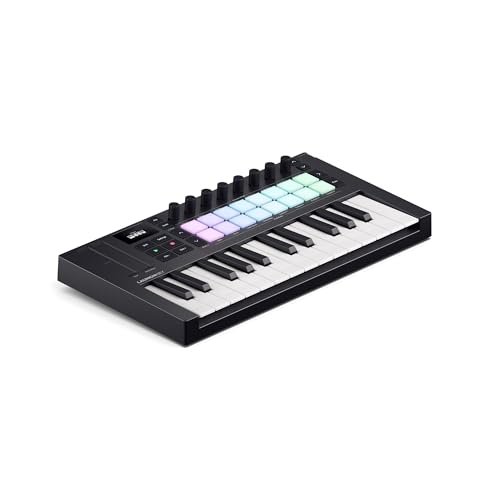
- 16 FSR pads for drumming, sequencing, and clip launching
- Works with major DAWs like Ableton, Logic, and FL Studio
- Scale Mode, chords, and arpeggiator support fast ideas
Best For: Portable keyboard users who work across multiple DAWs
Wireless Beat-Making Keyboard
M-VAVE 25 Key USB MIDI Controller

- Bluetooth connectivity with a built-in battery
- 25 velocity-sensitive keys and 8 RGB pads
- 8 knobs plus smart chord and scale features
Best For: Mobile creators who want wireless portability
FL Studio Control Pick
Novation FLkey 2 Mini 25 USB MIDI Controller Keyboard

- 25 mini keys with pitch and mod touch strips
- 16 pads for sequencing and finger drumming
- Eight knobs map to mix and effect control
Best For: FL Studio creators who want compact hands-on control
Portable Starter Choice
Akai Professional LPK25 25-Key USB MIDI Keyboard Controller

- 25 responsive mini keys with sustain support
- Built-in arpeggiator and octave controls
- Plug-and-play USB setup for Mac and PC
Best For: Songwriters and beginners who want a simple portable keyboard
Feature-Packed Performer
Akai Professional MPK Mini IV 25-Key USB-C MIDI Keyboard Controller, Black

- 25 mini keys with assignable knobs and a color screen
- 8 RGB MPC pads with velocity and pressure sensitivity
- Includes DAW integration, lessons, and software bundles
Best For: Producers who want compact controls, pads, and included software
Compact Beat-Making Starter – Akai MPK Mini MK3 25-Key USB MIDI Keyboard Controller
If you want a small but capable option in the midi controllers category, the Akai MPK Mini MK3 gives you the core tools for beat making, sketching ideas, and hands-on control. Its 25 velocity-sensitive mini keys, MPC-style pads, assignable knobs, and built-in arpeggiator make it a practical pick for music production on a desk or in a portable setup.
Best For: Producers and beat makers who want a compact MIDI keyboard with pads, knobs, and built-in performance tools.
Pros:
- 25 mini velocity-sensitive keys for studio production and virtual instrument control
- 8 backlit velocity-sensitive MPC-style pads with Note Repeat and Full Level
- 8 360-degree assignable knobs for mixing and plugin control
- Built-in arpeggiator plus a 4-way thumbstick for pitch and modulation control
Cons:
- Mini keys may feel limiting for players who want a fuller keyboard range
- USB-powered design keeps it focused on controller use rather than standalone operation
This is a strong entry-level production controller if you value pads and hands-on workflow over size. The included software bundle and sound content add value for getting started quickly.
Hands-On Workflow Pick – Arturia MiniLab 3 Universal MIDI Controller, Deep Black
The Arturia MiniLab 3 is a straightforward choice among midi controllers if you want a compact keyboard that keeps common production tasks close at hand. It is designed to help you control instruments, mute tracks, trigger pad drums, and adjust faders without constantly reaching for the mouse.
Best For: Producers who want an easy, compact controller for a streamlined hands-on workflow.
Pros:
- Easy keyboard controller built around a fluid, hands-on workflow
- Lets you control instruments, mute tracks, and trigger 8 pad drums
- Includes 4 faders for practical mix control
- Uses premium velocity-sensitive keys for responsive playing
Cons:
- The notes provided focus on workflow rather than deeper hardware specs
- Best suited to compact desktop setups rather than players needing a larger keybed
If your priority is speed and simplicity, this controller keeps essential actions within reach. It is a sensible pick for building ideas without a bulky setup.
Hybrid Studio Control Choice – Akai MPK Mini Plus 37-Key USB MIDI Keyboard Controller
For midi controllers that go beyond simple keyboard input, the Akai MPK Mini Plus adds more range and more connection options. Its 37-key keybed, CV/Gate and MIDI I/O, built-in sequencer, and DAW transport controls make it a flexible option for users who want to bridge software, hardware, and standalone composition.
Best For: Producers who want a compact 37-key controller with hardware connectivity and sequencing tools.
Pros:
- 37-key keybed gives you 3 full octaves for melodic and harmonic work
- CV/Gate and MIDI I/O expand control to modular gear, sound modules, and synths
- Built-in 64-step sequencer supports standalone composition
- 8 RGB MPC pads, 8 assignable knobs, and DAW transport controls
Cons:
- More advanced connectivity may be more than casual users need
- USB-powered design still keeps it in controller territory rather than a full instrument
This model stands out if you want a controller that can handle both beat-making and deeper studio integration. The extra keys and hardware connections make it more versatile than a basic compact board.
Clean Desktop Creator – Arturia MiniLab 3 Universal MIDI Controller, White
The white Arturia MiniLab 3 is another compact option in the midi controllers space, built for users who want a simple controller with practical hands-on features. It combines 25 slim velocity-sensitive keys, RGB pads, rotary encoders, a built-in arpeggiator, and touch sensors for pitch bend and modulation in a small desktop format.
Best For: Keyboard-based creators who want a compact, software-friendly controller with pads and faders.
Pros:
- 25 slim keys with velocity sensitivity for expressive playing
- 2 banks of 8 velocity and pressure-sensitive RGB pads
- 8 rotary encoders, 4 faders, and a mini display with browsing knob
- Built-in arpeggiator plus touch sensors for pitch bend and modulation
Cons:
- Compact 25-key layout may feel small for more piano-style playing
- Included software support is specific to the listed package and may not replace a full DAW setup
This version is a good fit if you want the MiniLab formula in a clean white finish and value a lot of controls in a small footprint. It is especially useful for fast browsing and hands-on editing on a Mac or Windows setup.
Ableton Clip Launcher – Akai Professional APC Mini MK2
If you want midi controllers built for hands-on Ableton sessions, the Akai Professional APC Mini MK2 focuses on clip launching, mixer control, and fast looping workflow. Its 8×8 RGB pad grid, 9 assignable faders, and pre-mapped Ableton Live integration make it a practical pick for studio sketching and live performance.
Best For: Ableton Live users who want a compact, performance-first controller with clip launching and faders.
Pros:
- 64 RGB pads provide clear visual feedback for launching clips, loops, vocals, and samples.
- 9 faders, including a master fader, offer hands-on control of volume, pan, and devices.
- Drum Mode and Note Mode support beat-making and melodic playability.
- USB-powered design keeps setup simple for studio or stage use.
Cons:
- Designed around Ableton Live, so it is most compelling for users in that ecosystem.
- Does not include built-in keys, so it is not a traditional keyboard-style controller.
Overall, this is a focused choice for creators who prioritize clip launching and tactile Ableton control over a broader keyboard layout. If your workflow is centered on loops, scenes, and mixing, it delivers the right kind of compact control.
All-in-One DAW Controller – Novation Launchkey Mini 25 MK4
The Novation Launchkey Mini 25 MK4 is a compact option among midi controllers for players who want keys, pads, and broad DAW support in one portable unit. It pairs premium keybeds with 16 responsive FSR pads, plus creative tools like Scale Mode, chord triggering, and arpeggio functions for quick idea building.
Best For: Producers and songwriters who want a compact keyboard controller with strong DAW integration and creative performance tools.
Pros:
- 16 FSR pads handle drumming, clip launching, step sequencing, and chord triggering.
- Works with major DAWs, including Ableton Live, Logic, Cubase, Reaper, FL Studio, and more.
- Scale Mode helps avoid wrong notes, while chord and arpeggio tools speed up songwriting.
- Includes software and lessons, such as Ableton Live Lite, Cubase LE, and Melodics.
Cons:
- The 25-key layout is compact, so players needing a larger range may want more keys.
- It is geared toward creative control rather than deep hands-on mixer-style control.
This is a strong fit if you want a portable controller that supports both melody writing and beat programming. Its broad software compatibility and creative features make it especially useful for fast sketching across different DAWs.
Wireless Beat-Making Keyboard – M-VAVE 25 Key USB MIDI Controller
The M-VAVE 25 Key USB MIDI Keyboard Controller is aimed at portable music creation, with Bluetooth connectivity, a built-in battery, and a compact 25-key layout. Among midi controllers, it stands out for combining velocity-sensitive keys, 8 RGB pads, 8 assignable knobs, and smart chord features for songwriting, beat making, and practice.
Best For: Mobile producers who want wireless MIDI control with pads, knobs, and a compact keybed.
Pros:
- Bluetooth support and a built-in 2,000 mAh battery make it highly portable.
- 25 velocity-sensitive keys plus 8 RGB pads support both melodic and beat-focused workflows.
- 8 assignable rotary encoders add control for mixing and synth tweaking.
- Compatible with Windows, Mac, Android, iOS, and major DAWs.
Cons:
- The compact 25-key format may feel limited for players who want more range.
- Wireless convenience may not be necessary for users who stay mostly in a studio setup.
This controller makes sense if you value portability and flexible connection options more than a full-size keyboard. Its mix of pads, knobs, and smart functions gives you a useful mobile sketchpad for composing anywhere.
FL Studio Control Pick – Novation FLkey 2 Mini 25 USB MIDI Controller Keyboard
If you want midi controllers that feel built around FL Studio, the Novation FLkey 2 Mini keeps the workflow focused and compact. Its 25 mini-keys, 16 velocity-sensitive pads, and eight mapped knobs are aimed at sketching ideas quickly, sequencing beats, and shaping a mix without constant mouse work.
Best For: FL Studio users who want a small, hands-on controller for writing, beat-making, and mix control.
Pros:
- Designed for FL Studio with direct control over Patterns, the Channel Rack, and the mix.
- 16 velocity-sensitive pads support finger drumming and step sequencing.
- Eight knobs map to levels, filters, and effects for quick tweak-and-play control.
- Scale, Chord, and arpeggiator tools help you build parts without extra theory work.
Cons:
- Only 25 mini-keys, so it is not ideal for players who want a larger keyboard range.
- Its strongest appeal is tied to FL Studio rather than being a broad all-around pick.
This is a practical choice if your priority is staying inside FL Studio and moving fast from idea to arrangement. The included software and plug-ins also make it easier to start creating right away.
Portable Starter Choice – Akai Professional LPK25 25-Key USB MIDI Keyboard Controller
Among compact midi controllers, the Akai Professional LPK25 keeps the setup simple and focused on playing. The 25 responsive mini keys, octave buttons, arpeggiator, and sustain control make it a straightforward option for sketching melodies, bass lines, and quick parts on a desk or on the go.
Best For: Songwriters and beat-makers who want a simple, portable keyboard controller with easy setup.
Pros:
- 25 responsive mini keys support expressive songwriting and composing.
- Octave up/down buttons expand the playable range for software instruments.
- Built-in arpeggiator and clock add creative control from a single USB cable.
- Plug-and-play USB power works with Mac or PC, plus broad software compatibility.
Cons:
- It is keyboard-focused and does not add pads or a large hands-on control surface.
- The mini-key format may feel limited for players who prefer full-size keys.
This is a solid pick if you want a lightweight controller that gets out of the way and lets you write. The programmable presets also make it easier to switch between DAWs and virtual instruments.
Feature-Packed Performer – Akai Professional MPK Mini IV 25-Key USB-C MIDI Keyboard Controller, Black
If you are comparing midi controllers for a more complete production setup, the Akai Professional MPK Mini IV brings a lot into a compact frame. It combines 25 velocity-sensitive keys, RGB MPC pads, eight assignable knobs, a color screen, and DAW integration so you can move through beat-making and performance tasks without relying on the computer as much.
Best For: Creators who want a compact controller with deeper hands-on control, pad performance, and included software.
Pros:
- 8 RGB MPC pads add expressive finger drumming with velocity and pressure sensitivity.
- Eight assignable knobs and a color screen support direct control of settings and presets.
- Includes DAW mapping, Ableton Live Lite 12, and a virtual instrument suite.
- Advanced features like chord, scale, and arpeggiator modes help spark ideas quickly.
Cons:
- Its feature set may be more than casual users need for very basic MIDI input.
- Still limited to 25 mini keys, so it is not a substitute for a larger keyboard.
For producers who want a travel-friendly controller with pads, knobs, software, and real-time navigation, this model stands out. The USB-C connectivity and full-size MIDI out also make it versatile across studio and mobile setups.
How We Picked the Best Midi Controllers
We focused on Midi Controllers that offer a strong mix of performance, layout, compatibility, and real-world usability. Priority went to models with reliable USB connectivity, good DAW integration, and controls that actually speed up production rather than add clutter.
We also weighed portability, keybed quality, pad response, knob count, and whether a controller fits specific workflows such as finger drumming, melody writing, or clip launching.
Quick Comparison
If you want an ultra-portable setup, a 25-key controller is usually the easiest choice. If you need more melodic range, a 37-key model gives you extra room without moving into full-size territory. Pad controllers are better for launching clips and beat performance, while keyboard-first designs suit chord progressions and note entry.
Among Midi Controllers, the most useful choice is the one that matches your production style: compact and simple for travel, or more expressive and feature-rich for studio work.
Key Buying Factors for Midi Controllers
Key Count and Size
25-key models are ideal for portable rigs and beat sketching. 37-key options help reduce octave switching and make melodic playing easier. If desk space is tight, compact controllers are often the smarter buy.
Pads, Knobs, and Extra Controls
Drum pads matter if you finger drum or trigger samples. Knobs are useful for mixing, plugin control, and parameter automation. Faders and transport controls are helpful, but only if your DAW workflow will use them often.
Keybed Feel and Playability
Light synth-action keys are common in small controllers and work well for most production tasks. Semi-weighted keys can feel more expressive, but they usually increase size and cost.
Software and DAW Integration
Some Midi Controllers are built for specific platforms like FL Studio, while others aim for broader compatibility. If you already use a preferred DAW, choose a controller with strong support for that software to reduce setup time and friction.
Portability and Connectivity
USB-C, Bluetooth, and bus-powered operation can be major benefits for mobile creators. If you travel, perform live, or work away from a studio, smaller and lighter designs will be easier to live with.
Who Should Buy Which Midi Controllers?
Beginners usually do best with a simple 25-key controller that offers essential controls without a steep learning curve. Beat makers and pad-focused users should prioritize models with responsive drum pads and performance features. Producers who play more melodies and chords may prefer a 37-key option for the extra range.
If you want a compact all-rounder, choose a versatile keyboard controller. If your workflow is built around drums, loops, and clips, a pad-first controller may be the better fit. For most buyers, the best Midi Controllers are the ones that stay out of the way and make music creation feel immediate.