The best audio interface with loopback makes it easier to combine microphones, instruments, computer audio, and streaming software without complicated routing.
We compare 10 compact USB interfaces across input flexibility, recording quality, monitoring, connectivity, and value so you can choose the right setup for your workflow.
Best 10 Audio Interface with Loopback Picks for 2026
Affordable Loopback Starter

- Two combo inputs with phantom power and Hi-Z support
- USB-C bus-powered, class-compliant setup
- 24-bit/192kHz recording with loopback and direct monitoring
Best For: Mobile creators and compact home studios
Versatile Creator Pick

- Loopback captures voice with app or game audio
- Adds MIDI I/O and a USB Type-A hub
- Includes creative software and a five-year warranty
Best For: Musicians, streamers, and beginners
Compact Loopback Alternative

- Two combo inputs with 48V phantom power
- USB-C bus power and plug-and-play operation
- Loopback, direct monitoring, and 24-bit/192kHz audio
Best For: Laptop users and mobile creators
Polished Recording Choice
Focusrite Scarlett 2i2 4th Gen

- 120dB dynamic range with 24-bit/192kHz support
- Auto Gain and Clip Safe simplify level control
- Air mode and extensive included recording software
Best For: Vocalists, guitarists, and two-channel producers
Flexible Value Pick

- Two combo inputs for microphones or instruments
- Loopback plus zero-latency direct monitoring
- 32-bit/192 kHz support and Input 1 phantom power
Best For: Home recording, streaming, podcasting, and flexible two-channel setups
Compact Songwriter Pick
Focusrite Scarlett Solo 4th Gen

- One XLR mic preamp and one Hi-Z instrument input
- 120 dB dynamic range with up to 192 kHz support
- Includes recording software and plugins
Best For: Solo musicians, songwriters, and portable home recording
Expanded Loopback Pick
Fender Quantum LT 4 USB-C Interface
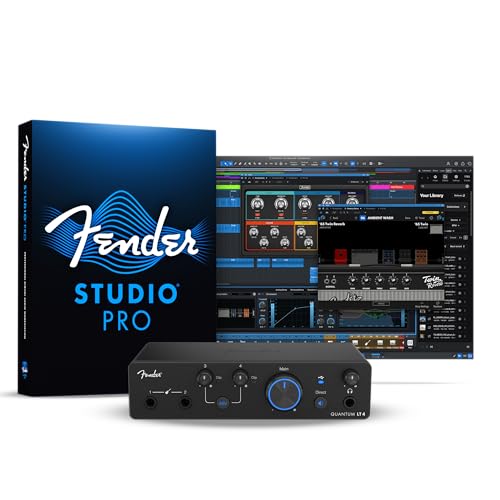
- 4x2 USB-C design with loopback routing
- Dual mic preamps and two instrument inputs
- Balanced outputs, headphone amp, and low-latency drivers
Best For: Streaming, podcasting, ensembles, and expanding home studios
Best for Loopback Streaming

- Virtual channels and loopback through ProStudio software
- 24-bit/192kHz recording with 56 dB preamp gain
- Compact design with direct monitoring and broad compatibility
Best For: Streamers, podcasters, and beginner home recordists
Best Budget Starter
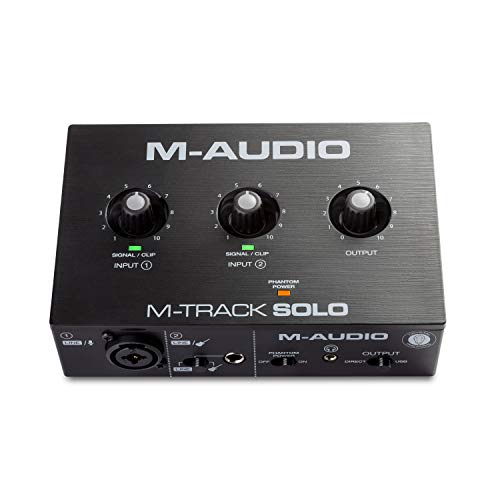
- Two-channel design for guitar, vocals, and line inputs
- USB/Direct switch supports zero-latency monitoring
- Includes MPC Beats and supports Ableton Live Lite
Best For: Beginners recording or streaming with basic inputs
Best High-Resolution Value

- 24-bit/192kHz recording with dual XLR/TS inputs
- 48V phantom power, HI-Z selection, and direct monitoring
- Includes cables and adapters for a flexible starter setup
Best For: Home musicians seeking high-resolution two-input recording
Affordable Loopback Starter – PIYONE Q2 Alloy Red
The PIYONE Q2 is a compact audio interface with loopback for creators who want a straightforward USB-C recording setup. Its two combo inputs, 24-bit/192kHz support, phantom power, and direct monitoring cover vocals, guitar, and basic home-studio work.
Best For: Mobile creators, home recording, and users seeking plug-and-play loopback functionality.
Pros:
- Monitor Mix/Loopback function supports streaming and content creation workflows.
- Two XLR/TRS combo inputs with 48V phantom power and Hi-Z capability.
- USB-C bus power, class-compliant operation, and no required drivers.
- 24-bit/192kHz recording and zero-latency direct monitoring.
Cons:
- The supplied details identify Windows compatibility, so other operating systems should be confirmed before purchase.
- It offers two input channels, which may limit larger recording sessions.
The Q2 prioritizes portability and simple setup while retaining useful features for streaming and recording. It is a practical choice when loopback and flexible two-channel connectivity matter more than extensive expansion.
Versatile Creator Pick – Arturia MiniFuse 2
The Arturia MiniFuse 2 is a flexible audio interface with loopback for recording voice, instruments, and computer audio. It combines two combo inputs, MIDI connectivity, a USB hub, and included creative software in a compact package.
Best For: Musicians, streamers, and beginners who need MIDI, loopback, and broad connectivity.
Pros:
- Loopback can capture voiceovers alongside in-app or in-game audio.
- Two combo mic/instrument/line inputs include 48V phantom power.
- Provides MIDI input and output plus a USB Type-A hub.
- Includes Ableton Live Lite, Analog Lab Intro, effects, guitar software, and other creative tools.
Cons:
- Its broader feature set may be more than needed for a simple two-input recording setup.
- The supplied specifications list four channels without detailing the exact channel routing.
MiniFuse 2 stands out for creators who want more than basic audio capture. Its loopback, MIDI, software bundle, and five-year warranty make it a well-rounded option for a growing setup.
Compact Loopback Alternative – PIYONE Q2 Alloy Grey
The PIYONE Q2 Alloy Grey is an audio interface with loopback designed for simple PC, Mac, or iOS recording setups. It offers two combo inputs, USB-C connectivity, 24-bit/192kHz audio, phantom power, and direct monitoring in a portable enclosure.
Best For: Laptop users and mobile creators who want loopback in a small two-input interface.
Pros:
- Monitor Mix/Loopback function is suited to streaming and content workflows.
- Two combo inputs accept microphones, line sources, and Hi-Z instruments.
- USB-C handles data and bus power without an external supply.
- Includes 48V phantom power, a 3.5mm headphone output, and direct monitoring.
Cons:
- Two inputs may not be enough for bands or multi-microphone recording.
- The supplied details list Windows as the operating system, so mobile compatibility should be verified for your device.
With the same core feature set as the red model, the Alloy Grey Q2 is best viewed as a compact, practical interface for creators who value easy setup and loopback over extensive I/O.
Polished Recording Choice – Focusrite Scarlett 2i2 4th Gen
The Focusrite Scarlett 2i2 4th Gen is a two-input USB-C interface for musicians who prioritize recording quality and easy level management. While the supplied details do not specifically list a loopback function, its broad computer and mobile compatibility, Auto Gain, Clip Safe, and included software make it a strong general-purpose recording option.
Best For: Vocalists, guitarists, and producers seeking refined two-channel recording with assisted gain control.
Pros:
- 120dB dynamic range and 24-bit/192kHz support target studio-quality capture.
- Auto Gain helps set microphone or guitar levels, while Clip Safe helps prevent clipping.
- Air mode adds presence and harmonic drive to vocals and guitars.
- Includes Pro Tools Intro+, Ableton Live Lite, Cubase LE, and Hitmaker Expansion.
Cons:
- Loopback is not identified in the supplied product details, so dedicated loopback users should verify current routing features.
- It has two channels and may not suit larger recording setups.
The Scarlett 2i2 4th Gen is a compelling choice when dependable recording tools matter more than confirmed loopback support. Its gain assistance, Clip Safe protection, Air mode, and software bundle make it approachable for new and experienced creators.
Flexible Value Pick – BOMGE BMG22 USB Interface
If you need an audio interface with loopback for basic recording, streaming, or podcasting, the BOMGE BMG22 offers two combo inputs, phantom power on Input 1, and direct monitoring. Its generic Windows and Mac USB support also keeps setup straightforward.
Best For: Home recordists, streamers, guitarists, vocalists, and podcasters who need flexible two-channel connectivity.
Pros:
- Loopback mixes the interface inputs with computer playback and returns the combined signal to the computer.
- Supports up to 32-bit/192 kHz resolution and includes Class A mic preamps.
- Offers zero-latency direct monitoring, stereo/mono output switching, and +48V phantom power on Input 1.
Cons:
- Phantom power works on Input 1 through its XLR socket, so setup matters for condenser microphones.
- DAW software is not included.
- The supplied notes identify generic driver support for Windows and Mac but do not specify newer operating-system compatibility.
The BMG22 is a practical, feature-rich choice when loopback and simultaneous mic or instrument connections matter more than a bundled software suite.
Compact Songwriter Pick – Focusrite Scarlett Solo 4th Gen
The Focusrite Scarlett Solo 4th Gen is a compact option for recording a microphone and guitar or another instrument. It provides 24-bit/192 kHz operation, a 120 dB dynamic range, and USB-C connectivity, though the supplied specifications do not list loopback.
Best For: Songwriters and solo musicians who want a portable two-input interface with bundled recording software.
Pros:
- Combines one XLR mic preamp with one Hi-Z instrument input.
- 120 dB dynamic range and up to 24-bit/192 kHz recording support are suited to detailed capture.
- Includes Air mode plus Pro Tools Intro+, Ableton Live Lite, Cubase LE, and Hitmaker Expansion software.
Cons:
- The supplied notes do not identify a loopback function, so verify this requirement before buying.
- Its two-input design is aimed at solo recording rather than larger ensembles.
- Air mode and the bundled software may be unnecessary if you already have a complete recording setup.
The Scarlett Solo is a strong streamlined recording package for one vocalist or instrumentalist, but it is not the clearest match if loopback is essential.
Expanded Loopback Pick – Fender Quantum LT 4 USB-C Interface
For creators who need an audio interface with loopback and more room for multiple sources, the Fender Quantum LT 4 provides four-channel, 4×2 USB-C connectivity. It pairs dual mic preamps with two instrument inputs, balanced outputs, a headphone amp, and low-latency drivers.
Best For: Growing musicians, streamers, podcasters, and content creators who need multiple inputs and flexible monitoring.
Pros:
- Loopback routing supports streaming, podcasting, and content-creation workflows.
- Two MAX-HD mic preamps provide up to 75 dB of gain, while two instrument inputs support guitars, basses, and line-level sources.
- Includes balanced TRS outputs, a powerful headphone amp, and up to 192 kHz operation.
- Registration provides access to the Fender Studio app, amp and effects pack, and a Fender Studio Pro six-month trial.
Cons:
- At 1.8 pounds, it is less lightweight than the Scarlett Solo.
- Some software benefits require registration and use of Fender’s ecosystem.
- Its expanded four-channel feature set may be more than a solo creator needs.
The Quantum LT 4 is the most capable fit here for creators who specifically want loopback alongside multiple mic and instrument inputs, low-latency monitoring, and balanced outputs.
Best for Loopback Streaming – MAONO PS22 Lite
The MAONO PS22 Lite is a strong choice if you need an audio interface with loopback for streaming, podcasting, or home recording. Its ProStudio Routing Software adds virtual channels and loopbacks, while 24-bit/192kHz recording, 56 dB of preamp gain, and 48V phantom power support detailed recordings with condenser or dynamic microphones.
Best For: Streamers, podcasters, voice actors, and beginners who want flexible routing alongside guitar and vocal inputs.
Pros:
- ProStudio Routing Software provides virtual channels and loopback functionality.
- 24-bit/192kHz recording and a stated 106 dB dynamic range support detailed audio capture.
- Includes 56 dB of preamp gain, 48V phantom power, and a dedicated instrument input.
- Compact design, direct monitoring, and Mac, Windows, and iPad compatibility simplify setup.
Cons:
- Loopback features depend on using the included ProStudio Routing Software.
- Users may need to select the MAONO (ASIO) driver in compatible recording software.
The PS22 Lite is the most purpose-built option here for an audio interface with loopback. It offers more routing flexibility than a basic entry-level interface, while its simple modes and plug-and-play design remain approachable for new creators.
Best Budget Starter – M-AUDIO M-Track Solo
The M-AUDIO M-Track Solo is a compact two-channel interface for recording, podcasting, and live streaming. While the supplied features do not specify loopback, it provides straightforward microphone, guitar, and line connections, plus a USB/Direct switch for zero-latency monitoring.
Best For: Beginners who need a portable interface for basic vocals, guitar, podcasts, or streaming.
Pros:
- Combines a combo XLR/line input with a separate line/instrument input.
- Supports condenser microphones with phantom power and includes a Crystal preamp.
- USB/Direct monitoring helps provide zero-latency monitoring during recording.
- Includes MPC Beats and supports Ableton Live Lite.
Cons:
- The supplied notes do not identify a loopback function or virtual routing software.
- Maximum sample rate is 48kHz, lower than the other listed interfaces.
The M-Track Solo is best viewed as a simple, inexpensive recording interface rather than a dedicated audio interface with loopback. Its clear input layout and direct-monitoring switch make it practical for first-time users who do not need advanced stream routing.
Best High-Resolution Value – CIXUN 2×2 USB-C Interface
The CIXUN 2×2 USB-C interface offers a high-resolution recording setup with dual XLR/TS inputs, 24-bit/192kHz conversion, and USB connectivity for PC, Mac, and mobile devices. It is not identified in the supplied notes as an audio interface with loopback, but its USB/Direct monitoring switch and dual outputs provide useful control for home recording and streaming.
Best For: Beginners and home musicians who prioritize high-resolution recording, phantom power, and flexible two-input connectivity.
Pros:
- 24-bit/192kHz recording captures detailed audio.
- Dual XLR/TS inputs, dual stereo outputs, and up to 100 dB of stated input gain offer flexibility.
- Includes HI-Z selection, 48V phantom power, and direct monitoring.
- Comes with multiple cables and adapters for computer and headphone connections.
Cons:
- The supplied notes do not specify a loopback feature or virtual routing software.
- Listed operating-system support is limited to Windows 10 in the product details, despite broader compatibility claims.
This CIXUN model is a feature-rich 2×2 option for users focused on high-resolution recording and straightforward monitoring. If loopback is essential, verify the routing capabilities before purchase; otherwise, its input flexibility and included accessories make it a practical home-studio choice.
How We Picked the Best Audio Interface with Loopback Options
We focused on interfaces suited to home recording, livestreaming, podcasting, online lessons, and music production. Our comparison considers input and output layout, USB compatibility, microphone preamp features, phantom power, direct monitoring, loopback support, portability, and ease of use. We also included both established models and budget-oriented options, since the best choice depends on whether you prioritize reliable drivers, extra inputs, simple controls, or the lowest price.
Specifications can vary by model and operating system, so confirm current software support and loopback implementation before buying—especially if you use macOS, iOS, or a professional streaming application.
Quick Comparison
- Best all-around two-input choice: Focusrite Scarlett 2i2 4th Gen offers a polished feature set for vocals, instruments, and content creation.
- Best compact single-input option: Focusrite Scarlett Solo 4th Gen keeps the setup simple for one microphone or instrument.
- Best for MIDI-equipped setups: Arturia MiniFuse 2 adds MIDI connectivity alongside its audio inputs.
- Best for more expandable recording: Fender Quantum LT 4 provides four inputs and a 4×2 configuration.
- Best budget-friendly candidates: M-AUDIO M-Track Solo, MAONO PS22 Lite, BOMGE, and the generic 2×2 interfaces emphasize core recording and streaming functions.
Key Buying Factors for an Audio Interface with Loopback
Inputs and Recording Needs
Two inputs are enough for a solo vocalist, guitarist, streamer, or two-person conversation. Choose four inputs if you regularly record multiple microphones, stereo instruments, or a small ensemble. Combo XLR/TRS jacks provide more flexibility, while dedicated instrument inputs are useful for guitar and bass.
Loopback and Routing
Loopback sends computer audio back into your recording or streaming software. Check whether it is built into the hardware, controlled through a mixer app, or dependent on a driver. Look for clear channel routing and independent monitor controls if you plan to blend music, game audio, calls, and a microphone.
Sound, Monitoring, and Compatibility
Higher sample rates and bit depth can be useful, but preamp quality, low-noise operation, stable drivers, and low-latency monitoring matter more in everyday use. Confirm USB-C or USB compatibility, iOS support if needed, headphone output behavior, phantom power, and whether direct monitoring can be balanced against computer playback.
Who Should Buy Which Audio Interface with Loopback?
Choose a simple single-input interface for solo recording and basic streaming. A 2×2 model is the most versatile fit for singers, guitarists, podcasters, and creators who need a microphone plus an instrument or second source. Select a four-input interface for collaborative recording or more complex live setups. MIDI users should favor an interface such as the MiniFuse 2, while buyers on a strict budget should compare the included loopback controls, driver support, and warranty rather than relying only on resolution numbers.