Finding the right speaker brackets for studio monitors can improve desk space, listening position, and overall setup stability. The best choice depends on your monitor size, mounting surface, weight, and preferred adjustment range.
This roundup compares 10 options, from compact desktop clamp stands to adjustable wall mounts, so you can choose a secure solution for your studio, workstation, or home audio system.
Best 10 Speaker Brackets for Studio Monitors Picks for 2026
Best Clamp-On Pick
Gator Frameworks Desktop Monitor Stands

- 0–15° adjustable tilt
- 10.13–13.5-inch height range
- 60-pound load capacity with EVA padding
Best For: Space-saving desktop studio setups
Best Wall-Mount Value
Mount-It! MI-SB37 Speaker Brackets

- 55-pound capacity
- Fits 5.38–11.13-inch-wide speakers
- 180° swivel and 7.5° downward tilt
Best For: Adjustable wall-mounted monitor and speaker setups
Best Compact Desk Stand

- Four height positions from 9–14 inches
- Clamps desks up to 2.6 inches thick
- 50-pound capacity with padded top plates
Best For: Small desktop studios with limited workspace
Best KRK-Specific Wall Bracket

- Made for selected KRK RP and VXT monitors
- 360° articulated adjustment
- Metal wall-mount construction
Best For: Compatible KRK studio monitor owners
Heavy-Duty Wall Mounts
Adjustable PA Speaker Brackets

- Supports up to 110 pounds
- Five adjustable wall distances
- 60° tilt and 180° swivel
Best For: Large PA speakers and high-capacity wall installations
Desk-Saving Choice
Vondynote Clamp Studio Monitor Stands

- Clamps to desks with a 0–2.6-inch range
- Four heights from 9 to 14 inches
- Supports monitors up to 50 pounds
Best For: Compact desktop studio-monitor workstations
Flexible Bookshelf Mounts
Pegzone Adjustable Wall Brackets

- Fits 5.1–11.2-inch-wide speakers
- Supports up to 55 pounds per mount
- Offers tilt, rotation, and swivel adjustment
Best For: Width-compatible bookshelf speakers and wall-mounted monitors
Best Desk-Clamp Pick

- 0–12° adjustable tilt
- 10.4–15.4-inch height range
- Supports up to 60 pounds per stand
Best For: Space-saving desktop monitor positioning
Best Large-Speaker Wall Mount
suptek Adjustable Speaker Mounts

- ±7.5° tilt and 45° swivel
- Supports up to 55 pounds per mount
- Fits 5.5–11-inch-wide speakers
Best For: Wall-mounted bookshelf or studio-style speakers
Best Adjustable Surround Mount
WALI Swivel-Tilt Speaker Brackets
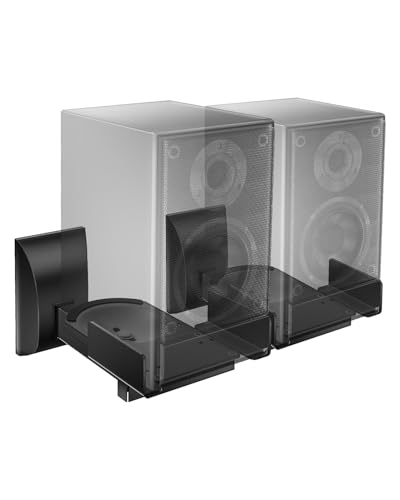
- ±7.5° tilt and 45° swivel
- Supports speakers up to 55 pounds
- Includes anti-slip pads and cable routing
Best For: Directional wall-mounted monitor or bookshelf speakers
Best Clamp-On Pick – Gator Frameworks Desktop Monitor Stands
For speaker brackets for studio monitors that preserve desk space, this Gator Frameworks pair clamps directly to the desktop while offering adjustable height and tilt. EVA padding helps protect the monitors and reduce unwanted resonance.
Best For: Desktop studio setups needing sturdy, space-saving monitor positioning.
Pros:
- Adjustable 0–15° tilt supports more precise sound projection.
- Height adjusts from 10.13 to 13.5 inches.
- EVA-lined surfaces help protect speakers and minimize vibration.
- 60-pound load capacity and firm desktop clamps provide stable support.
Cons:
- Designed for desktop clamping rather than wall mounting.
- The pair weighs 9.5 pounds, so it is not especially lightweight.
With broad compatibility, useful positioning adjustments, and a high stated load capacity, this set is a strong choice when you want monitor elevation without using floor space.
Best Wall-Mount Value – Mount-It! MI-SB37 Speaker Brackets
These speaker brackets for studio monitors are a flexible wall-mounted option for speakers between 5.38 and 11.13 inches wide. Their side clamps, swivel adjustment, and padded base make them suitable for studio, bookshelf, and surround-sound applications.
Best For: Wall-mounted speakers that need broad width compatibility and directional adjustment.
Pros:
- Pair of full-motion mounts swivels 180° and tilts 7.5° downward.
- Supports speakers weighing up to 55 pounds.
- Adjustable side clamps fit speakers from 5.38 to 11.13 inches wide.
- Steel construction, padded bases, and cable management support a tidy installation.
Cons:
- Requires wall installation and places speakers about 11 inches from the wall.
- Compatibility depends on the speaker fitting the stated width range.
The MI-SB37 stands out for its wide fit range and useful swivel-and-tilt movement, making it a practical choice for positioning monitors or speakers on a wall.
Best Compact Desk Stand – Vondynote Short Clamp Stands
For compact speaker brackets for studio monitors, the Vondynote set uses desktop clamps instead of large bases, leaving more usable workspace. Its four fixed height positions, padded top plates, and adjustable clamp fit make it practical for smaller desks.
Best For: Compact desktop studios that need adjustable monitor height and minimal surface footprint.
Pros:
- Four height positions from 9 to 14 inches provide flexible placement.
- Clamps fit desktops up to 2.6 inches thick.
- 9-by-9-inch padded top plates help reduce speaker vibration.
- Supports studio monitors and other equipment up to 50 pounds.
Cons:
- Height is limited to 14 inches, so it may not suit setups needing taller stands.
- Clamp mounting requires a compatible desk edge and installation with included hardware.
This pair combines a small desk footprint with a useful 9-to-14-inch range, making it a sensible choice when workspace is limited but monitor elevation is still important.
Best KRK-Specific Wall Bracket – KRK STDX68W1 Wall Bracket
KRK STDX68W1 Wall Mount Bracket for RP5G5, RP7G5, RP8G5, and VXT6/8 Studio Monitors
Check Price On AmazonThe KRK STDX68W1 is a dedicated wall bracket for selected KRK studio monitors, including the RP5G5, RP7G5, RP8G5, and VXT6/8 ranges. Its articulated design supports 360° adjustment for flexible wall positioning.
Best For: Owners of compatible KRK monitors seeking a purpose-built wall-mount solution.
Pros:
- Designed specifically for listed KRK RP and VXT studio monitors.
- Articulation allows 360° adjustment.
- Metal construction provides a dedicated wall-mount format.
Cons:
- Compatibility is limited to the specified KRK monitor models.
- The supplied notes do not state a load capacity or detailed installation hardware.
If you own one of the compatible KRK models, this bracket’s dedicated fit and full articulation make it more targeted than a universal mount; verify monitor compatibility before purchasing.
Heavy-Duty Wall Mounts – Adjustable PA Speaker Brackets
For buyers comparing speaker brackets for studio monitors or larger PA speakers, these wall mounts prioritize load capacity and positioning flexibility. Their alloy-steel construction supports up to 110 pounds, while adjustable extension, tilt, and swivel settings help direct sound where you need it.
Best For: Heavy PA speakers, home theater setups, studios, offices, and other wall-mounted installations requiring substantial support.
Pros:
- Supports speakers weighing up to 110 pounds.
- Five wall-distance settings extend from 11.5 to 15.7 inches.
- Offers up to 60° downward or horizontal tilt and 180° left-right adjustment.
- Includes two mounts, expansion screws, and setting screws.
Cons:
- The brackets are relatively large and heavy at 7.2 pounds per listed item set.
- Designed for wall mounting, so they are less suitable for renters or desktop-only setups.
- The notes focus on PA and bookshelf compatibility rather than specific studio-monitor dimensions.
This is the strongest-capacity option of the group and a practical choice when speaker weight and broad angle adjustment matter more than a compact profile.
Desk-Saving Choice – Vondynote Clamp Studio Monitor Stands
These Vondynote stands are a strong fit for shoppers seeking speaker brackets for studio monitors without drilling into a wall. The desk clamps use a small footprint, and the stands provide four fixed height positions while allowing placement directly against a wall.
Best For: Desktop studio monitor setups, compact workstations, and users who want adjustable height with no wall installation.
Pros:
- Clamp-mounted design saves desk space and can sit against a wall.
- Four height settings range from 9 to 14 inches.
- Supports studio monitors up to 50 pounds.
- Protective EVA pads help reduce scratches and speaker vibration.
Cons:
- Height adjusts through set positions rather than continuous adjustment.
- Requires a desk edge compatible with the 0- to 2.6-inch clamp range.
- Its 50-pound capacity is lower than the heavy-duty wall-mount option.
With a 9-by-9-inch top plate and compact clamp footprint, this pair is especially practical for small desks where floor stands and wall clearance are inconvenient.
Flexible Bookshelf Mounts – Pegzone Adjustable Wall Brackets
For compact speakers and many studio-monitor-style bookshelf speakers, these Pegzone speaker brackets for studio monitors combine width adjustment with broad directional control. They fit speakers from 5.1 to 11.2 inches wide and include protective pads for the speaker and wall contact points.
Best For: Bookshelf speakers and compatible monitors that need space-saving wall placement with flexible sound direction.
Pros:
- Each bracket supports up to 55 pounds.
- Adjusts to speaker widths from 5.1 to 11.2 inches.
- Provides ±10° tilt, 360° rotation, and ±45° side-to-side swivel.
- Protective pads help prevent scratches and reduce unwanted vibration.
Cons:
- Compatibility depends on the speaker fitting the stated width range.
- Offers less weight capacity than the 110-pound heavy-duty mounts.
- The supplied notes do not specify the wall-distance adjustment range.
This pair stands out when speaker width and aiming flexibility are priorities. Check your monitor dimensions before ordering, then use the included hardware and installation guidance for setup.
Best Desk-Clamp Pick – Vondynote Tilt Monitor Stands
For speaker brackets for studio monitors that preserve desk space, the Vondynote pair combines a clamp-on base with adjustable tilt and height. The 9-by-12-inch top plate supports monitors up to 60 pounds, while EVA padding helps reduce slipping and vibration.
Best For: Desktop studio monitor setups that need flexible positioning without using much surface area.
Pros:
- 0–12° adjustable tilt supports angled or level monitor placement.
- Height adjusts from 10.4 to 15.4 inches with a locking knob and security pin.
- Desk clamp fits surfaces up to 2.6 inches thick and includes protective EVA padding.
- Each stand supports speakers up to 60 pounds.
Cons:
- Designed for tabletop clamp mounting rather than wall installation.
- Compatibility depends on the speaker fitting the 9-by-12-inch top plate.
This is a space-conscious choice for monitors that benefit from height and tilt adjustment. Its clamp footprint is small, but users should confirm both desk thickness and speaker dimensions before buying.
Best Large-Speaker Wall Mount – suptek Adjustable Speaker Mounts
The suptek mounts are wall-mounted speaker brackets for studio monitors and bookshelf speakers, offering tilt and swivel adjustment for directional listening. Their all-metal construction supports up to 55 pounds per mount and works with wood studs, concrete, brick, or stone walls.
Best For: Wall-mounted speakers in home studios, media rooms, or other setups where freeing floor and shelf space matters.
Pros:
- Adjusts through ±7.5° tilt and 45° left/right swivel.
- Supports speakers up to 55 pounds per mount.
- Fits speakers 5.5 to 11 inches wide.
- Includes cable management and labeled installation hardware.
Cons:
- Not designed for soundbars.
- Requires suitable wall construction and secure installation.
- It is not water resistant.
With broad wall-surface compatibility and useful aiming adjustments, this pair suits larger bookshelf-style monitors. Check speaker width and mounting location carefully before installation.
Best Adjustable Surround Mount – WALI Swivel-Tilt Speaker Brackets
For speaker brackets for studio monitors that need directional control, the WALI wall mounts provide ±7.5° tilt and 45° swivel. They fit many bookshelf and surround speakers from 5.5 to 11 inches wide and use a solid metal inner construction with anti-slip pads.
Best For: Wall-mounted monitors or bookshelf speakers that need adjustable aiming and organized cabling.
Pros:
- Offers ±7.5° tilt and 45° swivel for flexible positioning.
- Supports speakers up to 55 pounds.
- Can mount to studs, concrete, or brick/stone walls.
- Anti-slip pads and integrated cable routing help keep speakers secure and wires tidy.
Cons:
- Not suitable for soundbar speakers.
- Speaker width must fall within the 5.5-to-11-inch range.
- Wall installation is required.
The WALI is a practical option when aiming flexibility is more important than a desktop footprint. Its fit range and wall requirements should be verified before purchase.
How We Picked the Best Speaker Brackets for Studio Monitors
We focused on the factors that matter most in real-world monitor installations: weight capacity, compatibility, mounting style, adjustability, stability, and available workspace. The selection includes desktop clamp-on stands, universal wall brackets, and model-specific mounts for popular studio monitors.
We also considered whether each bracket supports useful positioning features such as tilt, swivel, angle adjustment, side clamping, or placement close to a wall. Because studio monitors vary considerably in size and weight, compatibility should always be confirmed before purchase.
Quick Comparison
| Type | Best For | Main Advantage | Watch For |
|---|---|---|---|
| Desktop clamp stand | Desks and workstations | Easy installation and flexible placement | Desk thickness and clamp clearance |
| Universal wall mount | Bookshelf or compact monitors | Frees desk space | Wall strength and speaker dimensions |
| Heavy-duty bracket | Large or heavier speakers | Higher load capacity | More demanding installation |
| Model-specific bracket | Compatible KRK monitors | Precise fit | Limited model compatibility |
Key Buying Factors for Speaker Brackets for Studio Monitors
Weight and Size Capacity
Check both the maximum supported weight and the bracket’s width or platform dimensions. A mount rated for a high load may still be unsuitable if its clamps, shelf, or arms do not fit your monitor securely.
Desk or Wall Compatibility
Desktop models need enough clearance for their clamps and a desk that can support the combined weight. Wall mounts require suitable studs, masonry anchors, or other hardware rated for the installation surface. Do not rely on drywall anchors alone for heavy monitors unless they are specifically designed for that load.
Positioning and Adjustment
Tilt and swivel controls help aim speakers toward your listening position. A fixed or limited-angle mount can work well when the installation height and location are already correct, while adjustable brackets are more useful for changing workstations or asymmetrical rooms.
Stability and Vibration Control
Look for padded contact surfaces, secure clamping mechanisms, and hardware that minimizes movement. EVA foam or similar padding can help protect the speaker and reduce unwanted contact vibration, but it does not replace a properly tightened mount.
Who Should Buy Which Speaker Brackets for Studio Monitors?
Choose desktop clamp stands if you want a relatively simple installation, need to preserve desk space, or frequently adjust your setup. They are especially practical for compact monitors and home recording desks.
Choose universal wall mounts if you want speakers elevated and off the work surface. Measure the speaker cabinet carefully and verify the wall structure before installation.
Choose a heavy-duty adjustable bracket for larger monitors or PA-style speakers, provided the wall and mounting hardware can handle the load. If you own a supported KRK model, a model-specific bracket may provide the most precise fit.
Whichever style you select, mount both speakers at matching heights, aim the tweeters toward ear level, and recheck every fastener after installation.