The best portable video switchers make it easier to combine multiple cameras, presentations, and media sources without carrying a full production rack. They range from simple HDMI livestreaming tools to advanced units with SDI, recording, audio control, and remote operation.
We compare 10 portable video switchers for different production needs, including home studios, classrooms, events, worship services, and professional multicamera workflows.
Best 10 Portable Video Switchers Picks for 2026
Best All-Around HDMI Switcher

- Four HDMI inputs with multiview
- Built-in streaming and recording
- Transitions, keying, and audio mixing
Best For: Multicamera livestreams, training, presentations, and esports
Best Integrated Production Hub

- Six HDMI and USB video inputs
- Studio-grade XLR audio inputs
- Scenes, overlays, streaming, and ISO recording
Best For: Multi-camera productions with advanced audio needs
Best Flexible Streaming Deck

- Four HDMI inputs and dual HDMI outputs
- Three-platform streaming and recording
- Hardware controls with keying and overlays
Best For: Live events, podcasts, conferences, and portrait streaming
Best Operator-Friendly Switcher

- Standalone HD switcher and audio mixer
- Four-layer effects and keying
- Eight presets and optional remote control
Best For: Solo operators, live events, and HD livestreams
Best Compact HDMI Pick

- Four HDMI inputs with 2K support
- USB webcam output for streaming software
- Picture-in-picture layouts and remote LAN control
Best For: Solo streamers using compact HDMI camera setups
Best Advanced HDMI Mixer

- Eight HDMI inputs in a compact design
- Built-in preview monitor and AUX output
- 18-channel audio mixer with effects and sync delay
Best For: Live events and broadcasts needing advanced HDMI control
Best Hybrid Streaming Hub

- Combines SDI, HDMI, USB-C, and NDI HX sources
- Streams to up to three platforms
- Supports portrait and landscape production
Best For: Mobile productions with mixed camera connections
Compact 4K Creator Pick
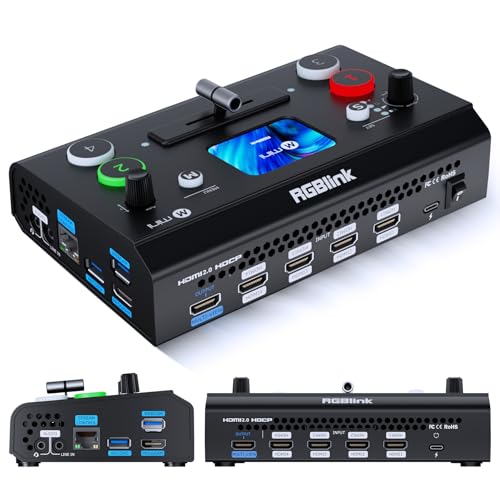
- Four HDMI inputs and dual 1080p outputs
- 2.1-inch touch screen with T-bar control
- UVC webcam mode and optional advanced features
Best For: Entry-level multi-camera streaming and lightweight HDMI setups
Mobile Production Kit

- Four HDMI/SDI inputs and two HDMI outputs
- Includes a 14-inch monitor and mounting plates
- Supports AC, DC, or USB power-bank operation
Best For: Field production teams needing an integrated mobile setup
Feature-Rich Compact Pick

- Four HDMI inputs with zero-latency switching
- Built-in 4-inch multiview display
- PTZ control, keys, PIP, presets, and AUX output
Best For: Small productions needing advanced switching and monitoring tools
Best All-Around HDMI Switcher – Compact Multicam Streaming
The Blackmagic Design ATEM Mini Pro is a practical choice among portable video switchers for creators who need four-camera HDMI production, built-in streaming, recording, and multiview monitoring in a compact unit. It also includes a built-in audio mixer and supports multiple transition and keying effects.
Best For: Multicamera livestreams, education, business presentations, and esports events.
Pros:
- Four HDMI inputs with 10-bit 4:2:2 video support.
- Built-in streaming, multiview output, and USB-C recording/webcam output.
- Includes multiple transitions, keyers, and a six-input, two-channel audio mixer.
Cons:
- Video inputs are HDMI only.
- Audio connectivity is limited to embedded HDMI audio and two 3.5mm stereo inputs.
Choose the ATEM Mini Pro when straightforward HDMI switching and integrated streaming features matter more than a larger input count or advanced front-panel controls.
Best Integrated Production Hub – RØDECaster Video
The RØDE RØDECaster Video stands out among portable video switchers by combining six video inputs with a studio-oriented audio interface. It supports HDMI and USB sources, customizable multi-source scenes, direct streaming, external recording, overlays, chroma keying, and hands-free switching options.
Best For: Multi-camera productions that need substantial audio control and flexible scene-based switching.
Pros:
- Supports up to six video sources through four HDMI and two USB inputs.
- Two Neutrik combo inputs provide XLR microphone and instrument connectivity.
- Offers direct streaming, external recording, ISO recording, overlays, chroma keying, and custom scenes.
Cons:
- Its feature-rich production approach may be more than simple switching setups require.
- Operation depends on corded power.
This is a strong fit when video switching and polished audio capture need to live in one production device, particularly for shows using multiple sources and repeatable scenes.
Best Flexible Streaming Deck – GoStream Deck HDMI Pro
The Osee GoStream Deck is one of the more versatile portable video switchers for users who want hardware controls, four HDMI inputs, direct streaming, recording, and landscape or portrait output options. Its keying, graphics, playback, and auto-switching features support a range of live-production formats without requiring a PC for core operation.
Best For: Education, conferences, worship, podcasts, weddings, and portrait-oriented social streaming.
Pros:
- Provides four HDMI inputs, two HDMI outputs, USB-C connectivity, Ethernet, audio I/O, and SD recording.
- Can stream to three platforms and supports USB streaming through software such as OBS or vMix.
- Includes T-bar control, macros, keyers, graphics overlays, playback, and auto-switching.
Cons:
- Its broad feature set may require time to learn.
- The included warranty is one year.
The GoStream Deck is a compelling option for operators who want a hands-on production surface with direct streaming, recording, graphics, and flexible orientation support in one device.
Best Operator-Friendly Switcher – Roland V-1HD+
The Roland V-1HD+ is a compact option among portable video switchers for live events and livestreams where quick setup and familiar controls are important. It combines standalone HD switching with a 14-channel audio mixer, four-layer effects and keying, automatic switching assistance, and memory presets for recurring layouts.
Best For: Single operators handling live events, livestreams, and compact HD productions.
Pros:
- Combines video switching and a 14-channel audio mixer.
- Includes four-layer effects and keying for graphics, lower thirds, and callouts.
- Offers automatic switching assistance, eight memory presets, and optional remote control through the V-1HD+ Remote application.
Cons:
- Video connectivity is HDMI-based.
- It is an HD switcher rather than a higher-resolution production system.
Consider the V-1HD+ when portability, approachable operation, and integrated audio are priorities for a solo operator who needs dependable control at live productions.
Best Compact HDMI Pick – RGBlink Mini Video Mixer
For creators seeking portable video switchers, the RGBlink Mini offers a straightforward way to manage up to four HDMI cameras or sources. Its USB 3.0 output appears as a webcam to computers, making it compatible with common streaming software and social platforms.
Best For: Solo streamers and small multi-camera productions that need compact HDMI switching, picture-in-picture layouts, and simple computer connectivity.
Pros:
- Supports up to four HDMI inputs with 2K input and output.
- Includes 14 transition effects and nine picture-in-picture layouts.
- USB 3.0 webcam output works with OBS, vMix, and other streaming software.
- Can be controlled remotely through a LAN connection without additional software.
Cons:
- Onboard recording requires the Mini-Pro or a higher model.
- Its HDMI-focused design is less suitable for productions centered on SDI sources.
The RGBlink Mini is a practical entry point for portable video switching when four HDMI inputs are enough. It emphasizes ease of use and streaming convenience rather than extensive broadcast routing.
Best Advanced HDMI Mixer – Roland V-8HD
The Roland V-8HD is one of the more capable portable video switchers for productions that need many HDMI sources and hands-on control. It combines eight-input video mixing with a built-in preview monitor, effects, keying, AUX routing, and a substantial digital audio mixer.
Best For: Live events, presentations, and broadcasts that require eight HDMI inputs, detailed source monitoring, graphics support, and integrated audio control.
Pros:
- Mixes up to eight HDMI sources in a lightweight, compact chassis.
- Built-in multi-viewer preview monitor supports source monitoring without requiring an external display.
- Offers five-layer effects and keying, AUX output, macros, sequencing, and preset memories.
- Includes an 18-channel digital audio mixer with effects and sync delay on every channel.
Cons:
- At 5.1 pounds, it is heavier than smaller four-input switchers.
- The workflow is HDMI-only, so it is not intended for native SDI inputs.
Choose the V-8HD when production flexibility matters more than minimum size. Its monitoring, routing, audio, and automation features make it a stronger fit for organized live productions than basic switching alone.
Best Hybrid Streaming Hub – Osee GoStream Duet
Osee GoStream Duet Multiple Camera SDI and HDMI Live Stream Video Mixer Switcher
Check Price On AmazonThe Osee GoStream Duet stands out among portable video switchers for hybrid productions using SDI, HDMI, USB-C, NDI HX, and playback sources. It also supports landscape or portrait workflows and can stream to up to three platforms simultaneously through Ethernet or a smartphone hotspot.
Best For: Mobile and professional streamers who need broad input compatibility, portrait and landscape output, multiple control options, and direct multi-platform streaming.
Pros:
- Supports four SDI, four HDMI, USB-C, NDI HX, and SD/SSD playback sources.
- Provides chroma key, luma key, pattern key, PIP, DSK, and multiple transition styles.
- Can stream directly to up to three platforms using Ethernet or a smartphone hotspot.
- Offers control through its built-in GUI, Mac and Windows software, or Bitfocus Companion.
Cons:
- The broad feature set may require more setup than a basic HDMI switcher.
- The free NDI HX license requires downloading the latest firmware to unlock it.
The GoStream Duet is a versatile choice when a compact setup must handle both SDI and HDMI equipment. Its streaming and control options make it especially useful for mobile events and mixed-source productions.
Compact 4K Creator Pick – RGBlink Mini V3
The RGBlink Mini V3 is a compact choice among portable video switchers for multi-camera streaming and small productions. It combines four HDMI inputs, a 2.1-inch touch screen, dual 1080p HDMI outputs, and UVC webcam mode in a lightweight 0.49 kg unit.
Best For: Entry-level creators, multi-camera live streams, and portable HDMI production setups.
Pros:
- Four HDMI inputs with professional T-bar control and a built-in touch screen.
- Dual HDMI outputs support program and preview monitoring.
- UVC webcam mode works with streaming platforms and software when connected by USB 3.0.
- Supports recording, PIP, chroma key, logo overlays, and transitions, with selected features available through TAO Cloud.
Cons:
- Some advanced functions, including recording and selected effects, require optional TAO Cloud activation.
- Setup requires current firmware, Ethernet internet access, and account binding for activation.
- A 35W or higher USB-C power adapter is recommended for stable operation.
The Mini V3 is a practical portable video switcher when low weight and flexible HDMI connectivity matter most. Buyers should factor in the activation process and optional feature licensing before choosing it for a production workflow.
Mobile Production Kit – Osee GoStream Duet Kit
The Osee GoStream Duet Kit is an all-in-one option for portable video switchers, combining a GoStream Duet mixer, 14-inch 1080p monitor, mounting plates, and multiple power options. Its four HDMI/SDI inputs and two HDMI outputs suit mobile multi-camera productions.
Best For: Mobile crews and creators who need an integrated switcher, monitor, mounting system, and flexible power setup.
Pros:
- Includes the switcher, 14-inch monitor, three cheese plates, and a built-in DC-to-Type-C cable.
- Four HDMI/SDI inputs, two HDMI outputs, and two USB ports support varied production connections.
- Can run from AC, DC, or a USB power bank.
- Built-in USB 5V output can power additional devices such as cameras.
Cons:
- At about 5 kg or 12 pounds, it is portable but substantially heavier than compact switcher-only units.
- The integrated kit may be more equipment than a simple desk-based streaming setup requires.
This kit emphasizes field readiness rather than minimal weight. Its monitor, mounting points, connection options, and three-way power support make it a strong fit when you want a self-contained mobile production package.
Feature-Rich Compact Pick – CINETREAK Mixer Plus
The CINETREAK Mixer Plus is a feature-focused option among portable video switchers, pairing four HDMI inputs with a built-in 4-inch multiview screen. It is designed for multi-camera streaming, online classes, events, YouTube, OBS, and Zoom.
Best For: Streamers and small production teams that want integrated monitoring, scene presets, and broadcast-style controls.
Pros:
- Four HDMI inputs support multi-camera switching with zero-latency switching.
- Built-in 4-inch display provides multiview monitoring with PGM, PVW, resolution, and audio indicators.
- Includes 30 transition effects and four user-defined scene presets.
- Offers VISCA-over-IP PTZ control, chroma and luma keying, PIP, DSK, logo overlay, and configurable AUX output.
Cons:
- Connectivity is centered on HDMI, with four listed HDMI ports.
- Its broad feature set may require more setup and learning than a basic HDMI switcher.
- The compact built-in screen is useful for monitoring but smaller than a dedicated production monitor.
Mixer Plus stands out when control flexibility matters more than the simplest workflow. Its multiview display, PTZ support, presets, and configurable AUX output give small productions room to build a more polished switching setup.
How We Picked the Best Portable Video Switchers
We evaluated these Portable Video Switchers by looking at input types, supported resolutions, switching controls, streaming and recording options, audio features, monitoring, portability, and overall workflow flexibility. Models with strong connectivity and straightforward operation were prioritized, while more advanced units were considered for buyers who need SDI, remote control, multiview, or integrated production tools.
Because portable production setups vary widely, there is no single best switcher for everyone. The right choice depends on your cameras, destination platform, crew size, and whether you need a complete production system or only basic source switching.
Quick Comparison
| Best For | Look For | Typical Advantage |
|---|---|---|
| Home streaming | HDMI inputs, USB output, simple controls | Fast setup and low learning curve |
| Multicam events | Four or more inputs, multiview, transitions | More camera coverage and control |
| Professional production | SDI, scalable control, recording, reliable I/O | Longer cable runs and advanced workflows |
| Mobile creators | Compact design, built-in display, USB-C | Easy transport and flexible connectivity |
Key Buying Factors for Portable Video Switchers
Inputs and Compatibility
Check whether your cameras use HDMI, SDI, or both. Also confirm resolution and frame-rate support, since a switcher may accept 4K input but process or output at a lower resolution. Matching all sources to a common format can prevent conversion problems during a live production.
Streaming, Recording, and Output Options
Some switchers connect directly to streaming platforms, while others require a computer or encoder. USB output is useful for software such as OBS, and built-in recording can provide a backup or an immediate file for editing. Review whether the unit supports clean program output, HDMI monitoring, USB-C, or network delivery.
Control and Monitoring
Physical buttons are valuable when you need fast, reliable cuts. Touchscreens, software control, macros, picture-in-picture, keying, and multiview monitoring add flexibility but may require more setup. A built-in screen can be especially useful in a compact mobile rig.
Audio and Portability
Decide whether audio will be handled by the switcher, a separate mixer, or a computer. Integrated audio tools simplify small productions, while dedicated audio interfaces may offer better control. Consider power requirements, mounting options, cable strain, and whether the unit fits your travel case.
Who Should Buy Which Portable Video Switchers?
Choose a straightforward HDMI model if you are streaming classes, interviews, gaming, or a small studio show and want minimal configuration. Step up to a switcher with more HDMI inputs when you regularly use several cameras, slides, or media sources at events.
Buy an SDI-capable model if your cameras are positioned far from the control desk or you need a more production-oriented installation. Models with recording, USB-C, touch control, and integrated audio suit creators who want a compact all-in-one kit. For professional teams, prioritize dependable connectivity, multiview, control-surface support, and the formats used throughout your existing system rather than choosing solely by input count.