Choosing the right controller can make a home studio feel faster, more expressive, and easier to control. The best options balance portability, workflow, and the features you actually use every day.
In this roundup of 10 MIDI controllers for home studios, we focus on practical choices for beatmakers, keyboard players, and producers who want reliable hands-on control without clutter.
Best 10 Midi Controllers for Home Studios Picks for 2026
Compact Beat Maker Controller
Akai MPK Mini MK3 for Home Studio Production

- 25 mini keys with velocity sensitivity
- 8 MPC-style pads plus 8 assignable knobs
- USB-powered with software bundle included
Best For: Portable beat making and compact home studio setups
Hands-On Mixing Surface
9 Fader 9 Knob USB MIDI Controller

- 9 faders, 9 knobs, and 9 buttons
- Built-in transport controls for DAW workflow
- Four memory banks for quick preset switching
Best For: Mixing and transport control in compact home studios
Feature-Rich Mini Keyboard
Donner DMK 25 Pro USB-C MIDI Controller

- 25-key portable controller with 8 pads
- Smart scales, arpeggio, note repeat, and chords
- Includes DAW software and 40 lessons
Best For: Beginners who want learning tools and creative extras
Dedicated Mix Controller
Akai MIDImix for DAW Hands-On Control

- 8 faders plus 1 master fader
- 24 knobs and 16 buttons for mix tasks
- Instant mapping with Ableton Live
Best For: Ableton-focused mixing and automation workflows
Portable Keys Starter
M-AUDIO Keystation Mini 32 MK3 USB MIDI Controller

- 32 mini velocity-sensitive keys
- USB plug-and-play for Mac and PC
- Includes MPC Beats and Melodics access
Best For: Laptop producers and home studio beginners needing a compact keyboard
Clip Launch Mixer
Akai Professional APC Mini MK2 USB MIDI Pad Controller

- 64 RGB pads for clip launching
- 8 faders plus 1 master fader
- Pre-mapped Ableton Live integration
Best For: Ableton users focused on clip launching and mixer control
Studio Keyboard Core
M-AUDIO Keystation 49 MK3 USB MIDI Controller

- 49 full-size velocity-sensitive keys
- Volume fader, transport, and wheels
- Includes software bundle and free lessons
Best For: Musicians who want a full-size keyboard as the center of a home studio
Beat-Maker MPC Workflow
Akai MPC Studio USB MIDI Pad Controller

- 8 banks of 16 RGB pads with aftertouch
- MPC2 software included with plugins and FX
- Ribbon strip, transport controls, and display
Best For: Beat-makers who want MPC-style pad control in a home studio
Portable Wireless Keys
Rockville M25 25-Key Bluetooth MIDI Keyboard
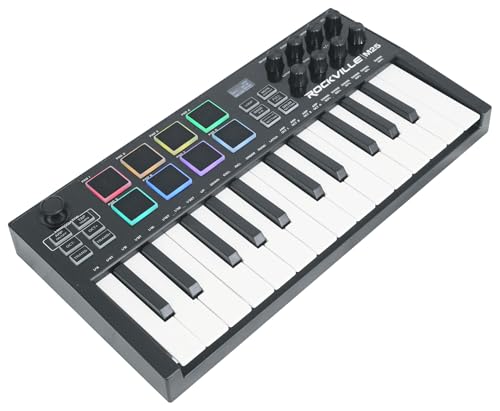
- 25 full-size velocity-sensitive keys in a compact body
- Bluetooth plus USB connection with rechargeable battery
- 8 pads, 4 knobs, 4 sliders, and arpeggiator
Best For: Portable producers who want wireless control in a small home-studio keyboard
Compact Wireless Production Keybed
M-VAVE 25-Key Bluetooth MIDI Keyboard Controller

- 25 velocity-sensitive keys with 8 RGB pads
- 8 knobs and 2 touch stripes for control
- Bluetooth plus 2,000 mAh battery for long sessions
Best For: Portable home-studio producers who want keyboard, pad, and control-surface features
Compact Beat Maker Controller – Akai MPK Mini MK3 for Home Studio Production
If you’re comparing midi controllers for home studios, the Akai Professional MPK Mini MK3 is a compact option built around hands-on beat making and software control. It combines 25 velocity-sensitive mini keys, 8 MPC-style pads, 8 knobs, and a thumbstick for pitch and modulation, making it easy to sketch ideas, program drums, and tweak virtual instruments from a small desk setup.
Best For: Home producers who want a portable all-in-one controller for beats, melodies, and basic DAW control.
Pros:
- 8 backlit MPC-style pads support Note Repeat and Full Level for drum programming and sample triggering.
- 8 assignable 360-degree knobs give you quick control over plugins, synth parameters, and mixes.
- Built-in arpeggiator and 4-way thumbstick add expressive control in a very compact footprint.
- Includes a software bundle with MPC Beats, virtual instruments, and sound content.
Cons:
- 25 mini keys may feel limited if you prefer a larger keyboard for two-handed playing.
- It is focused on performance and control, not on deep mixer-style hands-on routing.
This is a strong starter controller for tight home studio spaces, especially if you value pads and knobs more than a full-size keybed. The included software and portable USB design make it easy to get producing quickly.
Hands-On Mixing Surface – 9 Fader 9 Knob USB MIDI Controller
For home studios that need tactile control over a DAW, this USB MIDI controller offers a straightforward mixer-style layout with 9 faders, 9 knobs, and 9 buttons. It is designed for quick access to track levels, parameters, and transport commands, which can make mixing and recording feel more immediate than using a mouse alone.
Best For: Producers who want a compact desktop surface for fader-based DAW control and mixing.
Pros:
- 27 programmable controls provide flexible hands-on mapping for production and performance.
- Dedicated transport buttons cover play, stop, record, rewind, fast forward, and loop.
- Four memory banks make it easier to switch between DAWs or workflow setups.
- USB plug-and-play, bus-powered design keeps the setup simple in a home studio.
Cons:
- It is a control surface rather than a keyboard, so it does not offer melodic playing keys.
- The feature set is centered on mixing and DAW operation rather than instrument performance.
This model makes sense if your home studio workflow depends on faders, knobs, and transport control more than pads or keys. It is a practical choice for users who want compact, tactile mixer control without adding much desktop clutter.
Feature-Rich Mini Keyboard – Donner DMK 25 Pro USB-C MIDI Controller
If you want midi controllers for home studios with more built-in guidance and performance features, the Donner DMK 25 Pro packs a lot into a portable 25-key format. It is designed to work with DAW software on computer or mobile devices and adds 8 drum pads, an OLED display, smart scale modes, arpeggio, note repeat, chord functions, and multiple teaching resources for newer producers.
Best For: Beginners and home producers who want a compact controller with learning tools and creative performance features.
Pros:
- Smart dynamic scale mode and 16 scale tones help simplify melody and bass-line creation.
- 8 drum pads, arpeggio, note repeat, and chord functions expand performance options.
- OLED display and touch bar provide clearer visual feedback and pitch/mod control.
- Includes 4 DAW software options and 40 teaching courses for learning and setup support.
Cons:
- It does not generate sound on its own and must be used with a DAW or mobile device.
- USB-C and OTG compatibility may require checking your device connection before use.
This is a versatile pick if you want a compact keyboard that goes beyond basic note entry. The scale modes and included lessons make it especially appealing for learning-focused home studio users.
Dedicated Mix Controller – Akai MIDImix for DAW Hands-On Control
For home studios focused on mixing and automation, the Akai Professional MIDImix is a compact MIDI mixer controller built to put DAW parameters under your fingertips. With 8 faders plus a master fader, 24 knobs, and 16 buttons, it is aimed at users who want direct control over levels, EQ, sends, and track functions without reaching for the mouse.
Best For: Ableton Live users and home producers who want a compact mixer-style control surface.
Pros:
- 8 channel faders and 1 master fader support practical mix balancing.
- 24 knobs give plenty of control for EQ, sends, instruments, and effects.
- 16 buttons cover mute, solo, and record arm functions across channels.
- Instant 1-to-1 mapping with Ableton Live simplifies setup and workflow.
Cons:
- It is a mixer controller, so it does not include any keys for playing melodies.
- Its strongest integration is with Ableton Live, which may limit appeal for some workflows.
This controller is best if your home studio work is centered on arranging, mixing, and automation rather than playing notes in. It offers a focused hands-on surface that can speed up mix decisions and keep your workflow moving.
Portable Keys Starter – M-AUDIO Keystation Mini 32 MK3 USB MIDI Controller
If you want midi controllers for home studios that take up almost no desk space, this compact 32-key board is built for quick sketching and simple MIDI input. It connects by USB to Mac or PC with no extra drivers or external power supply, and the selectable velocity curves help match different playing styles.
Best For: Beatmakers, laptop producers, and home studio users who need a small, portable MIDI keyboard for fast idea capture.
Pros:
- 32 miniature velocity-sensitive keys in a very compact layout.
- Plug-and-play USB connection for Mac and PC with no external power needed.
- Pitch bend and modulation buttons plus octave controls for added expression.
- Includes MPC Beats software and access to Melodics lessons.
Cons:
- Mini keys may feel limiting if you prefer full-size piano-style keys.
- Fewer hands-on controls than larger studio keyboards.
- Best suited to basic playing and programming rather than performance-heavy workflows.
This is a practical entry-level controller for anyone who values portability and easy setup over a larger keybed. It works especially well as a space-saving songwriting and beat-making tool for a home studio.
Clip Launch Mixer – Akai Professional APC Mini MK2 USB MIDI Pad Controller
For midi controllers for home studios built around Ableton, this pad controller focuses on clip launching and hands-on mixer control. The 8×8 RGB pad matrix, 9 assignable faders, and pre-mapped integration with Ableton Live 11.2.7 and later make it a strong fit for loop-based writing and mixing.
Best For: Ableton users who want a compact pad controller for clip launching, mixing, and live-style workflow in a home studio.
Pros:
- 64 RGB pads provide visual feedback for clips, loops, vocals, and samples.
- 8 assignable faders plus 1 master fader for hands-on mix control.
- Pre-mapped integration with Ableton Live for direct workflow control.
- USB-powered and plug-and-play for Mac and PC.
Cons:
- Designed mainly around Ableton Live rather than general keyboard playing.
- No piano-style keys for traditional note entry.
- Best value comes when you are already working in a clip-based workflow.
This controller makes sense if your home studio centers on loops, scenes, and mixer tweaks instead of melodic keyboard performance. It keeps the surface focused while still offering enough control to build and shape a session quickly.
Studio Keyboard Core – M-AUDIO Keystation 49 MK3 USB MIDI Controller
If you need midi controllers for home studios with a more traditional keyboard feel, this 49-key model gives you full-size velocity-sensitive keys and a straightforward USB setup. It adds useful control features like a volume fader, transport buttons, pitch and modulation wheels, and a sustain pedal input for more expressive work.
Best For: Home studio musicians who want a full-size MIDI keyboard for playing parts, controlling software, and building out arrangements.
Pros:
- 49 full-size velocity-sensitive keys for a more natural playing feel.
- Volume fader, transport buttons, and directional controls for software navigation.
- Pitch/mod wheels, octave buttons, and sustain input add expression.
- Plug-and-play USB connection with bundled software and lessons included.
Cons:
- Less portable than a mini-key controller.
- No pads or deep performance controls for beat-focused workflows.
- May be more keyboard than some ultra-compact desks can comfortably handle.
This is the most balanced option here if you want a controller that can serve as the center of a home setup. It offers enough key range and onboard controls to handle both writing and everyday DAW work without feeling overly specialized.
Beat-Maker MPC Workflow – Akai MPC Studio USB MIDI Pad Controller
If you want midi controllers for home studios that feel built for beat-making, the Akai Professional MPC Studio is a strong pick. It combines velocity- and pressure-sensitive RGB pads, transport controls, a ribbon touch strip, and included MPC2 software so you can build and shape ideas without leaving your DAW workflow.
Best For: Beat-makers and producers who want hands-on pad performance with MPC software integration.
Pros:
- 8 banks of 16 RGB pads with velocity, pressure sensitivity, and aftertouch for expressive finger drumming
- Designed for 1:1 integration with MPC2 software and cross-compatibility with third-party DAWs like Ableton and Cubase
- Ribbon touch strip plus transport controls, LCD color display, Chords mode, and Scale mode for creative control
- Includes MPC2 software license with instrument plugins, mixing and mastering FX, and vocal tools
Cons:
- Pad-first layout is more specialized than a traditional keyboard controller
- Requires software workflow to unlock the full feature set
Overall, this is a focused controller for producers who want tactile beat creation and deep software pairing in a compact desktop setup. If your home studio centers on drum programming and sample-based production, it delivers a lot of control in a small footprint.
Portable Wireless Keys – Rockville M25 25-Key Bluetooth MIDI Keyboard
For home studios that need a compact keyboard controller with flexible connection options, the Rockville M25 is easy to place and easy to move. It gives you 25 full-size velocity-sensitive keys, Bluetooth wireless connectivity, and a rechargeable battery, making it practical for quick sessions, travel, or a clutter-free desk setup.
Best For: Musicians who want a portable 25-key controller with Bluetooth and battery power.
Pros:
- 25 full-size velocity-sensitive keys in a lightweight, compact design
- Bluetooth and USB connectivity for flexible use with DAWs and music apps
- Rechargeable battery rated for up to 10 hours of playtime
- Includes 8 velocity-sensitive pads, 4 assignable knobs, 4 sliders, and an arpeggiator
Cons:
- 25 keys may feel limited for players who want more range for piano-style parts
- Compact format prioritizes portability over larger control surfaces
In a home studio, the M25 makes sense if you want a small controller that can also go mobile without much hassle. It should suit producers who value wireless convenience, basic hands-on control, and broad DAW compatibility.
Compact Wireless Production Keybed – M-VAVE 25-Key Bluetooth MIDI Keyboard Controller
The M-VAVE 25-key controller is a practical choice for midi controllers for home studios when you want a compact keyboard with extra performance tools. It pairs velocity-sensitive keys with RGB pads, rotary encoders, touch stripes, Bluetooth connectivity, and included software support, so it can cover writing, beat programming, and synth tweaking in one small unit.
Best For: Home-studio producers who want a portable keyboard controller with pads, knobs, and wireless support.
Pros:
- 25 velocity-sensitive keys with 8 RGB backlit pads for beat production and finger drumming
- 8 assignable rotary encoders and 2 capacitive touch stripes for mixing and parameter control
- Bluetooth support plus a built-in 2,000 mAh battery rated for about 16 hours
- Compatible with Windows, Mac OS, Android, and iOS, plus major DAWs like Ableton, FL Studio, and Logic Pro X
Cons:
- 25-key layout is compact, so extended melodic parts may require more octave shifting
- Feature-rich layout can take some setup and learning for first-time users
This controller stands out for giving a lot of hands-on control in a travel-friendly format. For smaller studios that need pads, knobs, and wireless operation without giving up keyboard input, it offers a well-rounded feature set.
How We Picked the Best Midi Controllers for Home Studios
We focused on controllers that fit real home-studio workflows: compact footprints, enough pads or knobs for production tasks, and dependable USB or USB-C connectivity. We also looked at key count, transport and mixer-style controls, software-friendly layouts, and whether each model is better suited to composing, beat programming, or mixing.
Quick Comparison
For small desks and travel-friendly setups, 25-key mini controllers are usually the easiest fit. If you want a little more range for melody writing, a 32-key or 49-key model can feel less cramped. Pad-first controllers are often better for finger drumming and clip launching, while fader-heavy units make sense for mixing and automation.
Key Buying Factors for Midi Controllers for Home Studios
Key Count and Playing Feel
Choose the smallest keyboard that still supports your workflow. A 25-key controller saves space, but pianists and melody writers may prefer 32 or 49 keys to reduce octave shifting. If feel matters, pay attention to key action, velocity sensitivity, and whether the keybed supports semi-weighted performance.
Pads, Knobs, and Faders
Extra controls can speed up production dramatically. Drum pads are useful for beatmaking and clip triggering, while knobs are ideal for filter sweeps, plugin parameters, and synth tweaking. Faders are especially helpful for mixing, volume rides, and DAW control. For many Midi Controllers for Home Studios, the best value comes from the layout that matches your main task.
Connectivity and Compatibility
USB is the safest standard for most setups, but USB-C and Bluetooth can add convenience. Make sure the controller works with your DAW and operating system, and check whether you’ll need bundled software, drivers, or mapping setup. Class-compliant devices are often the simplest for a home studio.
Portability Vs. Desk Presence
If you work in a shared room or move between locations, compact controllers are easier to live with. If your setup stays put, a larger board may be worth the extra space because it reduces menu diving and gives you more control at once.
Who Should Buy Which Midi Controllers for Home Studios?
Beatmakers and finger drummers should prioritize pad-heavy controllers with good software integration. Keyboard-first producers should look at mini or full-size keybeds with enough range for chord work and bass lines. If your sessions involve automation, drum programming, and DAW control, mixer-style or hybrid controllers can be the smartest choice.
For most buyers, the best pick is the controller that fits the way you actually create music, not just the one with the most features on paper. Start with your desk space, then choose the layout that gives you the fastest path from idea to finished track.