If you’re just starting your musical journey, finding the right MIDI controller can make all the difference. These devices are designed to enhance your creativity and simplify music production, even if you have no prior experience. From compact keyboards to versatile beat makers, there’s something for everyone. Let’s explore the top 10 MIDI controllers that can help release your music potential and elevate your skills to the next level.
Akai Professional MPK Mini MK3 USB MIDI Keyboard Controller

The Akai Professional MPK Mini MK3 USB MIDI Keyboard Controller is perfect for beginners who want an intuitive and portable solution for music production. Weighing just 2 pounds and measuring 7.1 x 12.5 x 1.9 inches, it’s incredibly easy to transport. With 25 velocity-sensitive mini keys, 8 backlit drum pads, and 8 assignable knobs, you can quickly plunge into creating beats and melodies. It includes an extensive software package, making setup a breeze. Plus, its compatibility with any DAW guarantees you can start producing right away. Don’t forget to explore online tutorials to maximize your experience with this powerful controller!
Best For: The Akai Professional MPK Mini MK3 is best for beginners and aspiring music producers looking for a compact and user-friendly MIDI keyboard controller.
Pros:
- Lightweight and portable design makes it easy to carry for music production on the go.
- Includes a comprehensive software package, simplifying the setup process.
- Universal compatibility with any Digital Audio Workstation (DAW) enhances versatility.
Cons:
- Some users may find the installation process complex and may require additional tutorials.
- Limited built-in features without additional sound packs, which may incur extra costs.
- The small key size may not be suitable for users who prefer full-sized keys for playing.
Arturia MiniLab 3 MIDI Keyboard Controller

Ideal for both beginners and experienced musicians, the Arturia MiniLab 3 MIDI Keyboard Controller offers a compact design packed with essential features. With 25 velocity-sensitive keys and 8 multi-color drum pads, you’ll find it easy to create and control your music. Its lightweight build makes it perfect for on-the-go recording or performances. You’ll appreciate seamless integration with major DAWs like Ableton Live and Logic Pro. Plus, the included software suite, featuring Analog Lab V and Ableton Live Lite, enhances your creative process. With a 5-year warranty and eco-friendly design, it’s a smart choice for any musician.
Best For: Musicians of all skill levels looking for a portable and versatile MIDI keyboard controller for music production and performance.
Pros:
- Lightweight and portable design makes it easy to carry for recording or performing on the go.
- Seamless integration with major DAWs enhances music production workflow.
- Comprehensive software bundle includes tools for sound design and track creation.
Cons:
- Limited key range with only 25 keys may not suit all playing styles.
- Smaller pads and knobs may feel cramped for users with larger hands.
- No built-in speakers requires connection to an external audio system for sound output.
Donner MIDI Pad Beat Maker Machine

For those diving into music production, the Donner MIDI Pad Beat Maker Machine stands out with its 16 soft silicone backlit pads, designed to enhance your creativity and ease of use. Weighing just 1.81 pounds, it’s portable and fits nicely in your laptop bag. With customizable controls like two faders and knobs, you can tweak your sound effortlessly. You’ll love the vibrant lighting for visual grouping of instruments. Compatible with major DAWs on multiple platforms, it also comes with 40 courses to boost your skills. Plus, responsive customer support guarantees you won’t be left in the dark.
Best For: The Donner MIDI Pad Beat Maker Machine is best for both hobbyists and experienced music producers looking for a portable and versatile drum machine for live performances and studio use.
Pros:
- Customizable controls with two faders and knobs allow for personalized sound manipulation.
- Portable design makes it easy to transport and fits well in a laptop bag.
- Comprehensive learning resources with 40 courses and responsive customer support enhance the user experience.
Cons:
- Some users may experience issues with pad sensitivity, requiring more force than desired for activation.
- Compatibility with iOS devices may necessitate additional adapters for connection.
- The feel of buttons and pads may not meet the expectations of advanced drumming techniques.
TempoPAD Midi Controller Beat Maker Machine for Music Production

Looking for a versatile and user-friendly MIDI controller? The TempoPAD Midi Controller is your go-to beat maker for music production. With 16 responsive beat pads, 12 buttons, and 4 assignable knobs, you can easily customize your sound. Its RGB backlit pads enhance your drumming and sampling experience. Plug it into your laptop or tablet using USB Type C, and you’re ready to go! It’s compatible with major DAWs like Ableton Live and FL Studio, making it perfect for beginners. Keep in mind, it doesn’t produce sound on its own, so you’ll need software to release your creativity.
Best For: Musicians and producers looking for a portable, customizable MIDI controller that integrates seamlessly with popular DAWs for music production.
Pros:
- Versatile with 16 responsive pads and customizable RGB lighting for dynamic performance.
- Lightweight and portable design, making it ideal for on-the-go music-making.
- Compatible with a wide range of DAWs and devices, enhancing its usability.
Cons:
- Does not produce sound independently; requires external software for sound generation.
- Some users experience setup challenges and compatibility issues, particularly with mobile devices.
- May present a learning curve for beginners unfamiliar with MIDI controllers and configuration.
AKAI Professional LPD8 USB MIDI Controller

The AKAI Professional LPD8 USB MIDI Controller stands out as an excellent choice for beginners thanks to its 8 responsive RGB MPC drum pads. These velocity-sensitive pads let you trigger samples and loops effortlessly. You’ll love the 8 assignable knobs for mapping DAW parameters, giving you quick control over your music. Plus, its lightweight and portable design makes it easy to take anywhere. Compatible with popular DAWs like Ableton Live and GarageBand, setup is a breeze with USB connectivity. With a solid build and compact size, the LPD8 is perfect for enhancing your music production experience.
Best For: The AKAI Professional LPD8 USB MIDI Controller is best for beginners and mobile musicians looking for a compact and user-friendly MIDI controller.
Pros:
- Excellent pad sensitivity and reliability for triggering samples and loops.
- Lightweight and portable design makes it easy to transport.
- Easy plug-and-play setup with USB connectivity compatible with multiple DAWs.
Cons:
- Limited customization options and preset storage.
- Some users report stiff pads that may affect performance.
- Software may feel outdated for some users.
M-VAVE 25 Key USB MIDI Keyboard Controller

Designed with aspiring musicians in mind, the M-VAVE 25 Key USB MIDI Keyboard Controller offers an intuitive experience that makes music creation effortless. With 25 mini velocity-sensitive keys and 8 RGB backlit drum pads, you can easily craft beats and melodies. Its wireless Bluetooth connectivity and built-in 2,000 mAh battery give you up to 16 hours of portable playtime, perfect for your on-the-go lifestyle. Compatible with major digital audio workstations, you’ll seamlessly integrate it into your setup. Plus, smart chord and sound functions simplify your performance, making it an excellent choice for both practice and live sessions.
Best For: Aspiring musicians and producers looking for a portable, user-friendly MIDI controller to create music on the go.
Pros:
- Compact and lightweight design for easy transport.
- Wireless Bluetooth connectivity with a long-lasting battery life of up to 16 hours.
- Compatible with major digital audio workstations and includes helpful smart functions for performance.
Cons:
- Mini keys may not be suitable for those who prefer full-sized keys.
- Limited number of pads and encoders compared to larger MIDI controllers.
- Battery life may decrease over time with extensive use.
USB MIDI Pad Controller with 16 Velocity Sensitive Drum Pads

For aspiring musicians and creative minds, the USB MIDI Pad Controller with 16 velocity-sensitive drum pads is an ideal starting point. You can plug it in and start creating in seconds—no prior music skills needed. With 48 assignable pads across three banks, you’ll easily trigger drums, melodic samples, and effects. The responsive knobs and faders let you shape your mix without studio experience. Plus, its portable A5 design fits in your bag, so you can create anywhere. Just remember to use a DAW for sound, and you’re ready to release your creativity wherever inspiration strikes!
Best For: This USB MIDI Pad Controller is best for beginners, kids, and anyone looking to explore their creativity in music without prior experience.
Pros:
- Easy Plug & Play setup allows for instant creativity without needing music skills.
- Compact and portable A5-sized design makes it easy to carry and use anywhere.
- Versatile functionality with 48 assignable pads and responsive knobs and faders enhances music creation.
Cons:
- Requires a DAW software for sound output, as it does not produce sound on its own.
- Additional adapters (Micro USB, Lightning) must be purchased separately for mobile compatibility.
- Some users may find the learning curve for DAW software challenging initially.
RockJam 25 Key USB and Bluetooth MIDI Keyboard Controller
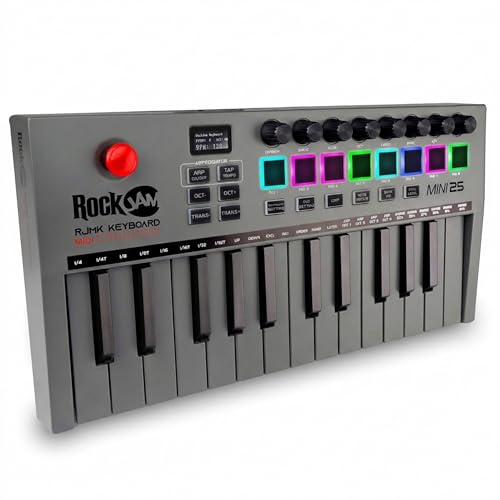
Looking for a portable and user-friendly MIDI controller? The RockJam 25 Key USB and Bluetooth MIDI Keyboard Controller is perfect for you. Weighing just 1.75 pounds, it’s compact enough to fit in small spaces and easy to transport. With Bluetooth connectivity, you can say goodbye to tangled cables. You’ll enjoy 25 mini keys, 8 velocity-sensitive pads, and 8 control knobs for versatile music creation. Plus, it features a rechargeable battery for on-the-go production. The included Simply Piano app and piano note stickers make learning a breeze, ensuring you’ll unleash your music potential in no time!
Best For: Beginners and music enthusiasts looking for a portable and user-friendly MIDI controller that enhances their music creation experience.
Pros:
- Compact and lightweight design makes it easy to transport and ideal for small spaces.
- Bluetooth connectivity eliminates cable clutter for a more streamlined setup.
- Includes beginner-friendly features like piano note stickers and access to the Simply Piano app for effective learning.
Cons:
- Non-weighted keys may limit dynamic expression for advanced players.
- Plastic construction might feel less durable compared to other materials.
- Limited key range of 25 keys may restrict advanced play techniques.
Midi Pad Controller, Portable Beat Maker Machine

The Midi Pad Controller, a portable beat maker machine, is perfect for aspiring musicians who want to immerse themselves in music production without feeling overwhelmed. With its velocity-sensitive pads and LED display, you’ll effortlessly create beats. The Bluetooth connectivity adds freedom, while three modes—Keyboard, Custom, and Dark—simplify your workflow. The bright 4×4 RGB pad matrix enhances your creativity, making clip launching in Ableton Live a breeze. Plus, with 16 MIDI pads for versatile production, you can manage mixing, muting, and recording easily. Its USB-C connection guarantees compatibility with other devices, making it an ideal choice for beginners.
Best For: Aspiring musicians and beginners looking for an intuitive and portable solution for music production and beat making.
Pros:
- User-friendly design with velocity-sensitive pads and LED display for easy beat creation.
- Bluetooth connectivity offers wireless functionality, enhancing mobility during live performances.
- Multiple operation modes allow for versatile music production tailored to individual preferences.
Cons:
- Limited advanced features may not satisfy experienced musicians seeking more complex functionalities.
- Battery life can be affected by continuous Bluetooth usage, necessitating regular recharging.
- Learning curve for complete beginners may still exist despite the interactive onboarding.
Beat Maker Machine with RGB Backlit Beat Pads

Featuring 16 RGB backlit beat pads, the Beat Maker Machine is perfect for aspiring music producers enthusiastic to plunge into beat creation. Its ultra-light and portable design lets you take it anywhere—camping, traveling, or performing. You’ll love the intuitive layout that enhances your creativity, with dedicated controls for easy access to key features. With 48 virtual pads across 3 memory banks and 4 velocity-sensitive curves, you’ll enjoy real-time responsiveness. Plus, its compatibility with most DAWs and plug-and-play design make setup a breeze. Get ready to elevate your music production game with this versatile and user-friendly beat maker!
Best For: Aspiring music producers and beginners looking for a portable and user-friendly beat-making experience.
Pros:
- User-friendly design with intuitive layout and dedicated controls for enhanced creativity.
- Portable and lightweight, making it easy to take on-the-go for travel, camping, or performances.
- Compatible with most DAWs and features plug-and-play connectivity for seamless setup.
Cons:
- Limited lighting functionality for one of the pads (PAD14 does not light up in key mode).
- Durability concerns may arise with frequent use of silicone pads.
- Learning curve for complete beginners to fully utilize all features effectively.
Factors to Consider When Choosing a Midi Controller for Beginners
When you’re choosing a MIDI controller as a beginner, it’s important to think about key features that suit your needs. Consider factors like portability, software compatibility, and the control options available to you. Budget is also a vital element, so you’ll want to find a controller that offers the best value for your money.
Key Features Needed
Choosing a MIDI controller can feel overwhelming, but focusing on a few key features can make the process easier. First, look for at least 25 velocity-sensitive keys or pads; they’ll provide a responsive playing experience, fundamental for both beginners and advanced users. Customizable controls are also important; assignable knobs and faders let you manipulate parameters in your Digital Audio Workstation (DAW) effortlessly. Models with built-in features like arpeggiators and drum pads enhance creativity, making beat-making more engaging. Compatibility with popular DAWs and operating systems is essential for seamless integration. Finally, consider a lightweight design with wireless connectivity options, ensuring easy transport and use in various settings, whether in the studio or during live performances.
Portability and Design
After identifying key features, it’s time to think about portability and design, especially if you plan to make music on the go. Look for MIDI controllers that weigh around 1.5 to 2 pounds, making them easy to transport. Ideally, they should fit comfortably in a laptop bag, with dimensions around 7 to 12 inches in width and no more than 2 inches in height. A durable build and rubberized bottoms can provide stability in various environments, like studios or cafes. Wireless options, such as Bluetooth, help eliminate cable clutter and allow for use with mobile devices. Finally, opt for controllers with a plug-and-play setup, so you can quickly connect and start making music without any technical hassle.
Software Compatibility
How can you guarantee your MIDI controller enhances your music production experience? Start by ensuring it’s compatible with major digital audio workstations (DAWs) like Ableton Live, FL Studio, and Logic Pro. This compatibility makes your workflow smoother and more efficient. Look for controllers that offer a single download for all included software upon registration, simplifying setup and reducing technical issues. It’s also essential that the controller supports both Windows and Mac operating systems, ensuring versatility across different environments. Many MIDI controllers bundle software packages, providing additional virtual instruments or sound libraries that add value. Finally, check for class-compliant USB connectivity, which allows for easy plug-and-play setup without needing extra drivers, perfect for beginners.
Control Options Available
The right control options can make a world of difference in your music production journey. When choosing a MIDI controller, consider the number and type of controls, like velocity-sensitive keys, drum pads, and knobs. These features can greatly enhance your creativity. Look for assignable controls that let you map functions to specific knobs or pads, allowing for a customized workflow. Additional features, such as built-in arpeggiators and pitch/modulation controls, provide flexibility during music creation. Multiple banks for pads or knobs can expand your triggering options, especially in live settings. Finally, opt for user-friendly interfaces with visual feedback, like backlit pads, to ease your learning process and improve your overall experience as a beginner.
Budget Considerations
When you’re diving into the world of MIDI controllers, budget plays a crucial role in your decision-making process. Prices can vary widely, from affordable options around $100 to advanced controllers exceeding $300. For beginners, entry-level controllers priced below $150 often come with essential features like velocity-sensitive keys and drum pads, making them ideal for new users. Don’t forget to account for any additional costs, like software or sound libraries, as some controllers include valuable bundled software. Prioritize controllers with good build quality, since investing in durability can save you money later. Finally, keep an eye out for sales and promotions, especially during holidays or back-to-school seasons, to snag a higher-quality product within your budget.
Learning Resources Provided
Choosing a MIDI controller that offers robust learning resources can greatly enhance your experience as a beginner. Many controllers come with software packages that include virtual instruments and production tools, giving you hands-on practice right away. Some models even provide access to online courses or tutorials, guiding you through the music production process with practical exercises. Look for user-friendly interfaces with clearly labeled buttons, making navigation simpler and reducing your learning curve. Verify compatibility with popular digital audio workstations (DAWs) so you can experiment across different software environments. Additionally, certain controllers offer built-in learning modes or interactive onboarding, helping you grasp the device’s functionalities and capabilities quickly. These resources can make your journey into music creation much smoother.